

Lite-On SOHW-1673S DVD Burner Review

Hello guest,
default
To benefit from all extra features you need to log in or sign up.

Author

OC-Freak
Retired Senior Admin
Article posted 25 Apr 05 16:29

Introduction


Review: Lite-On SOHW-1673S DVD-Writer
Reviewer:
OC-Freak
Provided by:
Lite-On IT
Firmware: JS04 and JS05
Manufactured: December 2004

It’s just a short while since we tested the SOHW-1653S, but now there is a new drive already; The SOHW-1673S. We are familiar with Lite-On drives for several years and their drives do usually perform very well and has many features compared to their low price. Let us see if this drive continues this trend and could keep up with the competition, especially from NEC and BenQ that have made some exceptionally good DVD-Writers. Let’s take a look at the already well know Lite-On history.

Some Lite-On history:

In 1995 Lite-On gathered some elite scientist and engineers from ITRI (Industrial Technology Research Institute) to start an optical storage research and manufacturing business in Taiwan. Currently they have over 130 engineers with Master & Ph. D. degrees in their Research & Development team, that are dedicated to the development of their patented anti-vibration mechanical design, advanced circuit design, firmware programming & performance tuning. The Research & Development team achievement is a key factor that has ensured their success in product development.

In 1997, Lite-On established a large manufacturing facility in China enabling them to provide optimum OEM/ODM support to all 1st-Tier PC makers, which further demonstrated their success in the worldwide Optical drive market. Today, they are among top-3 optical drive manufacturer worldwide, mostly due to attractive pricing and quality filled products, along with large OEM contracts. They have also received top brand name recognition in many regions. These achievements, plus superb management visions and planning, enabled them to continue their growth and profit even at times when the optical drive market experienced “price-wars” and many optical drive manufacturers were forced out.

In 1999, they created LITE-ON Information Technology Corporation, another proud member of the Lite-On Group, to concentrate on developing and manufacturing optical drives to stay strong in the storage business. They are going to carry on the tradition of developing optical drives to expand their research and manufacturing capacity to new generations of products such as DVD drives, High speed CD-RW drives and COMBO drives to stay strong in both the retail and OEM/ODM market.

At 9th July 2001 Lite-On IT signed a co-operation contract with JVC, a famous Japanese electrical company, to be in alliance with each other. Two new companies was established, one is the optical drives manufacturing sales company, named as JVC LITE-ON IT Manufacturing & Sales, Limited (JLMS) , the other is pick-up head developing & manufacturing company.

JVC is a pioneer in development of key components of optical drives and consumer electronics as well, Lite-On IT is excellent in volume manufacturing and developing, also skilled in IT industry. That kind of strategic alliance would benefit both companies.

If you have read our previous Lite-On reviews you may already feel familiar with this company information, so let us now take a look at the specifications of this drive:

Drive specifications:


These are the specifications of this drive, found at the Lite-On webpage:

SOHW – 1673S 16x 8x / 16x 6x / 16x / 4x + 48x 24x 48x Half-Height DVD-Dual

  • ATAPI / E-IDE Half-Height internal DVD+R / DVD+RW / DVD-R / DVD-RW / DVD+R9 / DVD-ROM / CD-R/ CD-RW / CD-ROM combination drive
  • Support Double Layer DVD+R9 Recording Function
  • SMART-BURN avoiding Buffer UnderRun Error, Automatically adjusting writing strategy & running OPC to provide the best burning quality
  • SMART-X function adjusts CD-DA / VCD / DVD data extraction to a fastest allowable speed according to both data request rate from host and disk quality
  • VAS® system reduce vibration and noise during recording and reading
  • Support Fixed Packet, Variable Packet, TAO, SAO, DAO, Raw Mode Burning & Over-Burn
  • DVD read compliant : DVD single / dual layer ( PTP / OTP ), DVD-R ( 3.9 GB / 4.7 GB ), DVD-R multi-borders, DVD+R, DVD+R multi-sessions, DVD-RW, and DVD+RW
  • CD read compliant : CD-DA, CD-ROM, CD-ROM / XA, Photo-CD, Multi-session, Karaoke-CD, Video-CD, CD-I FMV, CD Extra, CD Plus, CD-R, and CD-RW
  • Supprot both 8 cm and 12 cm disc of CD and DVD family
  • Conform to Orange Book : Part 2 CD-R Volume 1, Part 2 CD-R Volume 2 Multi Speed, Part 3 CD-RW Volume 1 ( 1x, 2x, and 4x ), Part 3 CD-RW Volume 2 : High Speed, Part 3 CD-RW Volume 3 : Ultra Speed

Supported transfer mode : PIO mode 4, DMA mode 2 and Ultra DMA mode 2

DVD Family :

Write

DVD+R

16x ( 21600 KB/sec ) maximum by CAV


DVD-R

16x ( 21600 KB/sec ) maximum by CAV


DVD+R9

4x ( 5400 KB/sec ) maximum by CLV


ReWrite

DVD+RW

8x ( 10800 KB/sec ) by Z-CLV


DVD-RW

6x ( 8100 KB/sec ) by CLV


Read

16x ( 21600 KB/sec ) maximum by CAV


Access time

160 ms


CD Family :

Write

CD-R

48x ( 7200 KB/sec ) maximum by P-CAV


ReWrite

CD-RW

24x ( 3600 KB/sec ) maximum by Z-CLV in UltraSpeed disc


Read

48x ( 7200 KB/sec ) maximum by CAV


Access time

160 ms


Buffer Size :

2 MB


PC Required :

Pentium III 450 MHz or faster CPU and 128 MB or higher RAM are required


650 MB HDD available capacity; and 5 GB free space for creating a DVD image file


Compatibility :

Windows 98 / NT 4.0 / ME / 2000 / XP


MTBF ( Life ) :

70,000 Hours


S/N Ration :

> 75 dB


Environment :

Operating

5C to 45C; Relative Humidity : 15% to 80%


Non-Operating

-40C to 60C; Relative Humidity : 15% to 95%


Dimension :

145.0 ( W ) x 41.3 ( H ) x 170.0 ( D ) mm


Weight :

< 0.9 Kg


Voltage Requirements :

+5V +/-5% and less than 100 mVp-p ripple voltage


+12V +/-5% and less than 200 mVp-p ripple voltage

The specifications are very good, and we can’t find any noticeable drawbacks. It should also write with CAV technology, which is promising for low recording times and high average recording speeds.

What’s inside the box?


Let us start out pretty easy by taking a look at what we got and what the box contained.
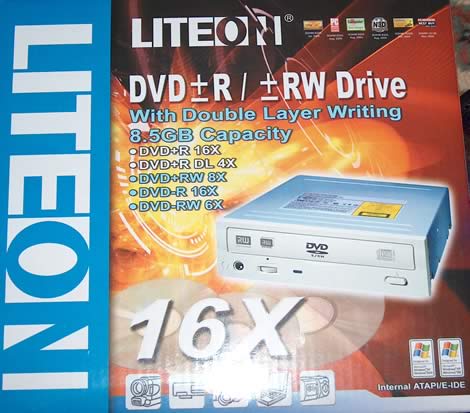
 

The drive we received was a retail drive that came in a nice looking box, pretty identical to earlier boxes we have seen from Lite-On. Let us take a look at the content of the box:
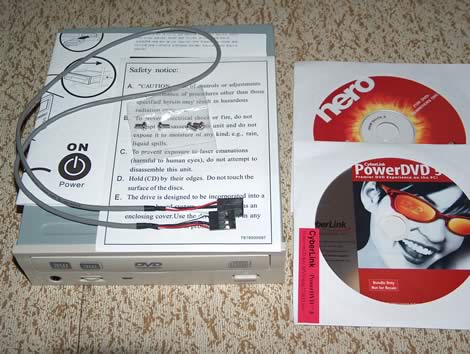
Looks like a very small bundle but to make sure that we do not miss anything, we list what we got below:

This is what the Retail bundle consists of:

  •        The drive itself
  •         Cyberlink PowerDVD software CD
  •          Nero software CD
  •          Quick installation manual
  •          Screws
  •          Audio cable

Far from the best bundle we have seen, we are missing an IDE-Cable, a thicker manual and some empty media.

Now it’s time to take a look at the drive itself:
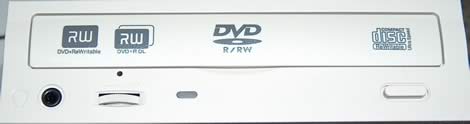
 

Nothing new under the sun here, it uses the usual Lite-On front that we have gotten quite used to now.
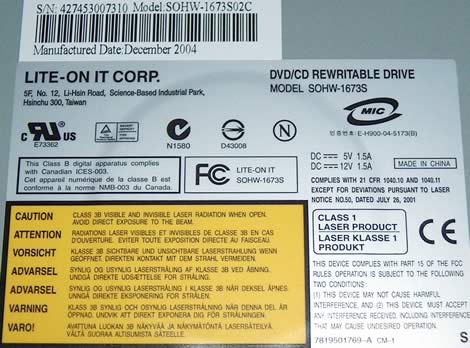
 

Our sample was produced in China and has a production date of December 2004.
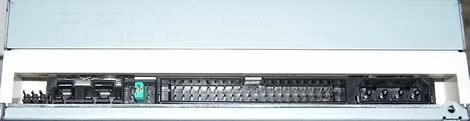
 

Still no changes on the back either; from the left: undocumented pins used for calibrating the drive at the factory; digital audio connector; analogue audio connector; pins and jumper to set the drive to cable select, slave or master; IDE connector and finally the power connector.

Now, let us connect the drive and check out the features and program bundle of this drive on the next page…


26 Comments

Jupp01
Posts: 14
Posted on: 15 Apr 05 15:16
PyMusique is now removing also the Microsoft DRM. So after Apple, DVDJon has now beaten MS. PyMusic is much faster and better than Tunebite, and it's free!
johnny k
Posts: 23
Posted on: 24 Apr 05 21:54
Whew! lucky, it was a toss up between this drive and the LG GSA-4163B I,m glad I got the LG, bloody good drive and a better price by $30 my way, Nice review
lui_gough
Posts: 1195
Posted on: 25 Apr 05 04:10
I brought a liteon - and I think it's gonna have to be NO MORE LITEON purchases in the future - i think BENQ is my preference .... just not satisfied wid how picky the liteon is wid media
Hansy
Posts: 140
Posted on: 26 Apr 05 14:02
I just noticed your post on this product, and I would like to point one thing: this software is for Windows, so why should Windows users care about Apple ? Or did i get something wrong ? :B
Kogarah
Posts: 5
Posted on: 28 Apr 05 04:09
I've had a SOHW-1673s for around five weeks & am surprised by the negative comments but there again how does one know if the writing is bad? I haven't had problems (that I am aware of). :+ There again there have been two firmware updates (which don't explain the changes) so this could have improved things I guess? :S I'm happy with the drive & have prefered Liye-On for years - they have never let me down. maybe the SOWH-1693 will be better?
ranzi
Posts: 16
Posted on: 27 Oct 05 10:51
Tunebite 2.0 re-records very fast in digital quality all the songs with DRM protection to free MP-3, WMA or OGG format. Also music that you have bought at Apple iTunes with a subsidised price for your standard MP3-Player. Cool!
SunRod
Posts: 1
Posted on: 16 Jan 06 16:59
I tried installing Tunebite to trial & when it got to the point of configuring the sound card it made my machine screech like a banshee before kicking up primary drive 'Serious Errors' & blue screening. Has anyone else had problems like these?
geebee755
Posts: 1
Posted on: 02 Nov 06 21:18
Ok, TuneBite is NOT a solution if you're actually looking to crack (for legit reasons, see below) a WMA. Want to save money and not buy TuneBite? Get yourself a CDRW, burn the song track, then re-rip it as MP3 - all within Media Player. All TuneBite does is mimic this and save a step. You STILL need Windows Media Player 10 in order to download the legit license for the song. So, TuneBite is NOT a WMA crack. Boy, don't you TuneBite users feel duped now? lol. Legit reason for needing to actually CRACK a WMA is if you have legitimately purchased WMA music off such sites as Puretracks, need to transfer the .wma media to your nice new Mac or Linux box where Windows Media Player isnt available. So, you need to actually BREAK the DRM not just simulate a burn->rip.
Hansy
Posts: 140
Posted on: 29 Nov 06 12:53
I don't feel duped at all, especially when I am downloading a lot of protected media. I prefer paying a few dollars to get a software that does it all for me with one push of a button, then use x softwares and perform manually all the tasks. And there is also a question of legality. Tunebite does not CRACK anything, it just makes it easier for me to get un-protected songs legally. Maybe if you would have used Tunebite you'd have known what I am talking about and realised that your post is totally clueless :r
donkey007
Posts: 12
Posted on: 14 Jan 07 23:09
OK OK Boys (..and girls) don't fight over simaple things. There are two ways to look at this situation here. One, if you have plenty of time, no money to spend the the buring on CD is right solution. As far as I know, whether you use WM Player or iTume, you can only create a audio CD (not mp3 or other like wise) from DRM protected tracks and an audio cd can hold about 15 - 20 tracks. So if you have 70 - 80 tracks you need 4-5 CDS to burn them and converting them back to MP3 format. If you plenty of time to sit around on your computer then by all means go ahaed. Two, if you have lots songs you can buy this software (there are plenty available on the net ..) and convert them to a legecy format like MP3. However this software has it's own share of drawbacks and security flaws. This software relies on your DRM License and iTune Active Account details to play the music in the first place, so when you load these songs in this kind of software, this software can transmit those details to acutal software writer (this can happen ...) and this person can login to your iTume or Napster account without you even knowing it. I must advise you, if you are using this kind of software, please disable you internet connection. Lastly, there very simple way of converting you music to unprotected format. Just play the music as is and record them using a AUDIO Editor (if you have NERO or Easy CD you should have very basic sound editor) as it was playing and save them as WAV Files or other fromat the software allowes you to. It's obvious that if you record in WAV files they will very large files so you need plenty of space and very time consuming. I have over this by playing 10 songs playlist and recording them to a single file and then trimimg each song and saving them to individual file. Time consuming and Hard Drive hungry process indeed but very secure and reliable process.
whatistravis
Posts: 1
Posted on: 15 Jan 07 04:22
Hey, I installed the tunebite trial and when it was configuring my soundcard there were a couple of beep sounds and then boom... my computer has been without sound output ever since. I have tried editing my windows settings, downloading drivers, and downloading windows registry edits. I also tried messing around with the sound options in tunebite. Anyone know what I can do to fix this?
erchless
Posts: 1
Posted on: 20 Jan 07 03:24
Help! I'm having the same problem as whatistravis. Does anyone know how to fix it? I need sound back.
dadofbrook
Posts: 5
Posted on: 31 Jan 07 08:37
I tried both NoteBurner(http://www.noteburner.com) and TuneBite(http://www.tunebite.com). These two software can convert WMA or even protected itunes music (M4P) to MP3. They worked perfectly on my computer. The only difference between TuneBite and NoteBurner is that TuneBite uses recording technique while NoteBurner burns music onto a virtual CD-R. I cannot tell any difference in terms of the music quality. But I would agree that NoteBurner is faster and more reliable than TuneBite. I recommend NoteBurner.
guest
Posts: 15288
Posted on: 15 Mar 07 07:02
You are right, dadofbrook. I tried NoteBurner and it converted my iTunes music so perfect!
guest
Posts: 15288
Posted on: 14 Apr 07 22:50
The thing is, we download porno and when try to watch it comes up the license thing, that takes you to their web page to join in. I just want to see Alison Angel...its frustrating you have to download and can't watch it. I have tried Tunebite, SoundTaxi, Jodix and none works with this kind of video protected file.
guest
Posts: 15288
Posted on: 21 Apr 07 15:21
Can anybody say IN CLEAR WAY how to crack this damn frigging copy protection in wma file? I downloaded such file from eMule and I need to convert it into normal mp3 file which will be played without any payments. I'm outraged because of this sick copyright policy. The biggest thieves on the world are companies which manage the copyrights and take payments for it.
guest
Posts: 15288
Posted on: 29 Jul 07 01:00
I have a problem with that too. I bought a few songs from Musicmatch, I want to put them in a CD, so I can listen to them at work and in my car and so on, but since they are protected, it doesn't allow me to burn them into a CD, I am sick of it!! Obviously, I am trying to find a way to be able to burn them, I don't care about the formar, I just want to put them in a CD, does anyone know how can I do it since I don't have the burn rights? :c
guest
Posts: 15288
Posted on: 10 Aug 07 23:23
Try Protected Music Converter at wma-mp3.com. It can convert protected songs into unprotected WMA, MP3, OGG, or WAV files. Plus the 2-week free trial converts the whole song rather than just one minute of it.
guest
Posts: 15288
Posted on: 13 Aug 07 09:37
I found another much easier one, NoteBurner it burns DRM music on virtual CD and it is more economical than burn on physical CD
guest
Posts: 15288
Posted on: 06 Sep 07 13:57
I recommend MelodyCan (http://www.convert-any-media.com/index.php) It`s easy to install. MelodyCan converts audio and video files from MusicMatch too. Also supported different file formats ( wma, m4p, rax, mp3, wav etc.) So just a few mouse clicks and you can enjoy your lovely music) :g
guest
Posts: 15288
Posted on: 24 Nov 07 16:53
SoundTaxi Pro. I have both TuneBite and SoundTaxi Pro. SoundTaxi Pro Rips Tunebite.
guest
Posts: 15288
Posted on: 26 Jun 08 09:06
TuneClone (http://www.tuneclone.com) convert the protected music with a high speed via a virtual cd burner. :g
guest
Posts: 15288
Posted on: 10 Jul 08 11:22
I use Tunebite for a while, it's a good program, it converts over 60 files, both audio and video files. What I'd like to point out is its good quality after conversion.
guest
Posts: 15288
Posted on: 14 Aug 08 10:41
I have a question, the music u convert from napster/rapsody with tunebite or other various softwares, is it now legally yours? can you share it on limewire and other sites legally, becuase it blongs to you now?
guest
Posts: 15288
Posted on: 17 Sep 08 20:24
@mike cent: It's "legally yours" for fair use-can copy to another of YOUR devices (pc, mp3 player...etc) but not "legally yours" to redistribute. It's just like with cd's, if you have a large collection and rip all the tracks to your computer to copy onto your ipod, then it is legal. However, if you share all those tracks with everyone on some kind of p2p network and if RIAA finds out they will either try to sue you or ask for $$$$$$ so they won't sue you.
guest
Posts: 15288
Posted on: 08 Oct 08 16:52
help i have a loud pop at the begining of each song, you think a rock hit the windshield.

Post a comment














