Sony AW-G170A DVD Burner Preview

Hello guest,
default
To benefit from all extra features you need to log in or sign up.

Author

Dee
Senior Administrator and Reviewer
Article posted 15 Oct 06 14:34

Introduction


image001


Preview: Sony AW-G170A
Reviewed by:
Dee-27
Provided by:
CDFreaks
Firmware: 1.71
Manufactured: August 2006

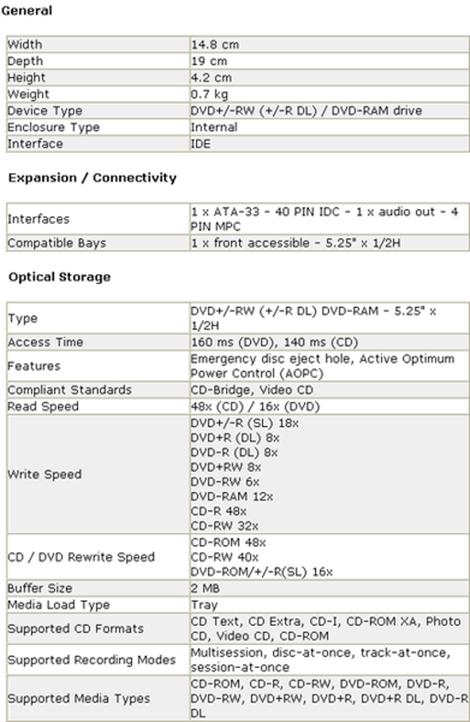
We at CDFreaks would like to present a preview of one of the latest DVD-ReWriters from Sony NEC Optiarc inc. \’? the Sony AW-G170A. The Sony AW-G170A supports 18x DVD±R, 8x/6x DVD+RW/DVD-RW, 12x DVD-RAM and 8x DVD+R DL/DVD-R DL writing technology, allowing Double/Dual Layer discs of 8.5Gb to be written.

Drive specifications:

specs_resize

What\’s inside the box?


Since the drive is a bulk drive, there is neither a retail box nor any software, cables or fixing screws.
DSC00143

Now it\’s time to take a look at the drive itself.

bezel_resize

The bezel of the Sony AW-G170A is plain but not an unattractive style. The front sports a single (green) LED for read/write, an emergency eject hole and the eject/close button. The logos located on the bezel include: a DVD Alliance DVD+R DL logo, a DVD-R DL multi recorder logo, and a CD-RW Ultra Speed logo.
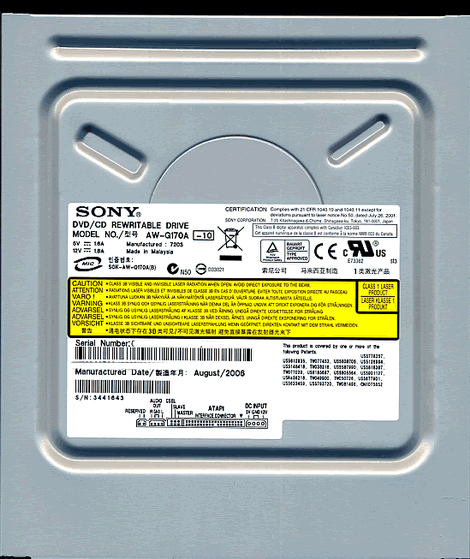
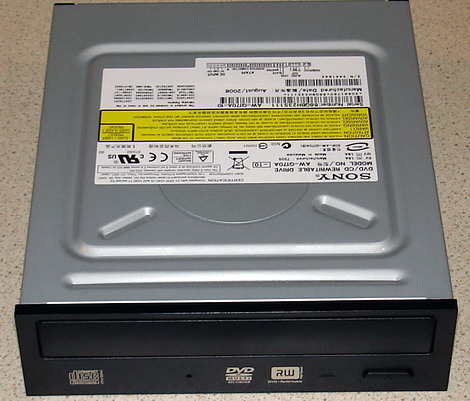
drive top_resize

Top

label_resize

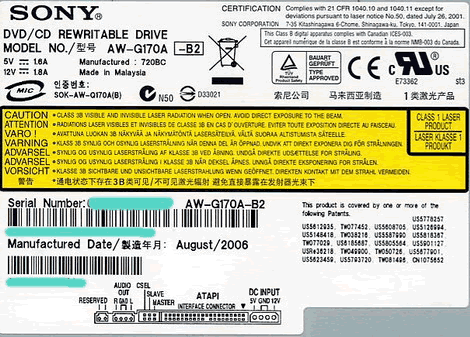
On the top of the drive we found one label, and we can see the drive was manufactured in Malaysia, during August 2006.
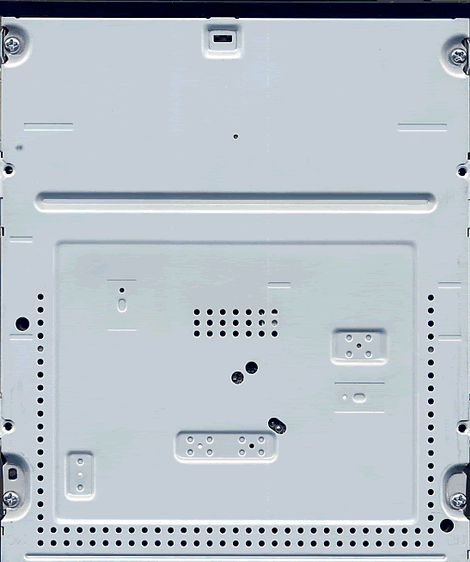
drive bottom_resize

Bottom

drive rear_resize

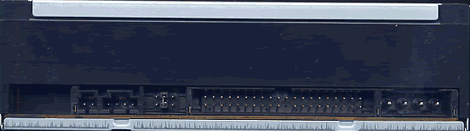
On the back of the drive there various connectors, they are from the left: Digital Audio connector; analogue audio connector; pins and jumper to set the drive to cable select, slave or master; IDE connector, power connector.

Now, let us install the drive and check out the features on the next page…


43 Comments

mallxx
Posts: 9
Posted on: 12 Nov 06 03:30
ive just purchased a SONY AW-G170A BUT ICARNT GET IT TO WORK ON DVD-RAM (W2K)drivers required CAN ANYBODY HELP ? THIS IS crazxxy !
Dr. Who
Posts: 4514
Posted on: 13 Jan 07 23:31
Also note this software program works well with anydvd too. And is 32 & 64 bit vista compliant as well.
guest
Posts: 15288
Posted on: 18 Feb 07 00:43
sucher Treiber für Windows XP für OPTIARC DVD RW AD-7170A .... 1.85
guest
Posts: 15288
Posted on: 10 Mar 07 23:24
I have a Sony AW-G170A which I have just bought but it will not read or write. It does all the right things except recognise a disc. The supplier has sent a replacement and allowed me to keep the old one. Is it recoverable or should I just bin it?
guest
Posts: 15288
Posted on: 15 Mar 07 22:29
Well at least your one is seen by your system. My XP doesn't even see mine and it was only purchased five hours ago. I'm starting to think that technology is fraying at the seams in this day and age. 40 miles to return it to the store and 40 miles home isn't fun with something broken from new.
guest
Posts: 15288
Posted on: 17 Apr 07 01:14
i have this burner and just found out that all dvd-r discs i recorded at 2x speed are whack- 0% quality score, all red graphs
mickmbc
Posts: 6
Posted on: 18 Apr 07 10:15
i have had 3 of these drives and had no problems at all good burns good drive mickmbc
guest
Posts: 15288
Posted on: 19 Apr 07 10:37
This is a good drive that works for me, but why is it so loud when reading/burning discs?
guest
Posts: 15288
Posted on: 20 Apr 07 09:31
I also have the Sony AW-G170A, with XP Home and SP2, but the drive is recognized as CD ROM only. It does record onto CR-R, but no chance with DVD. I used the firmware version 1.71 according to the clear instructions on this site but no improvement. Any ideas to help?
guest
Posts: 15288
Posted on: 20 Apr 07 10:26
post by iengine try firmeware 173 its on dee @liggys download page or at sony website
guest
Posts: 15288
Posted on: 01 May 07 18:42
reply to iengine I had the same problem.XP did not recognize the Sony AW-G170A as a burner. I downloaded the free cd burner software from http://www.audioi.com/cd-dvd-writer.htm And this software did recognize it as a burner and finally worked.Give it a try....
guest
Posts: 15288
Posted on: 16 May 07 14:28
I have similar issues with my AW-G170A. I bought it new three weeks ago and from day one the drive seldomly recognises discs and when it does it operates louder than my previous drive - Sony CRX320A. I guess there is a bad batch out and about. I'm reluctant to return the drive because the problem is intermittent and I'm hesitant in flashing the firmware because it's still under warranty. I will persist until it dies then I will return it :-)
guest
Posts: 15288
Posted on: 20 May 07 22:56
Heard enough good comments on Sony AW-G170A, any difference compared to Sony AW-Q170A?
guest
Posts: 15288
Posted on: 04 Jul 07 00:26
Had my drive for ages now and have never been able to save anything to the DVD +R discs. Tried all manner of free software and nero, but still no luck. Am I being dumb? but the new discs register as 0 available and 0 used space, tried the update Firmware from this forum too, which didn't seem to make any difference. Trouble was those experts at the shop when I took it back say it was working fine, gotta be my machine or me???
saurabh.ag31
Posts: 2
Posted on: 27 Aug 07 22:11
also have the Sony AW-G170A, with XP Home and SP2, but the drive is recognized as CD ROM only. It does record onto CR-R, but no chance with DVD. I used the firmware version 1.71 according to the clear instructions on this site but no improvement. Any ideas to help?
saurabh.ag31
Posts: 2
Posted on: 27 Aug 07 22:12
also have the Sony AW-G170A, with XP Home and SP2, but the drive is recognized as CD ROM only. It does record onto CR-R, but no chance with DVD. I used the firmware version 1.71 according to the clear instructions on this site but no improvement. Any ideas to help?
guest
Posts: 15288
Posted on: 18 Sep 07 06:18
I have SONY DVD RW AW-G170A, It's a good drive and I too accept as it is so loud when reading/writing discs. The sound is heavy than a System's rebooting sound. And while rebooting the system, Sony DVD's LED blinks now and earlier it was not blinking. I don't know the reason. Can anybody help me.
guest
Posts: 15288
Posted on: 03 Oct 07 23:29
I have a sony aw-q170a, work fine but not reconize a dvd rw 4 x, when i try to erase say not erase dvd , any help please? Thnaks in advance
guest
Posts: 15288
Posted on: 08 Oct 07 01:56
my aw-drive don't read any disks and makes a clicking noise, drive was fine for about 6 months, flash drive to updated firmware and drive was fine still, now drive is not working not no what has happen to it. strange, this is my second drive now from pc world and also a sony dvd was broke down with in a week of having it from pc world. are pc world selling crap gear or what ?.
guest
Posts: 15288
Posted on: 23 Oct 07 15:48
From the day i brought this thing it has only given me problems. It is in warranty so i already have got it replaced two times and it looks like the third ain't far away as i brought man on fire and it wont allow me to watch the movie . I was told this was the best :crap:
Petrologist
Posts: 5
Posted on: 28 Oct 07 06:48
Twenty discs in cakebox, DVD+R MCC001 home movies burn at only 2x on LaCie LightScribe Samsung-Toshiba for Macs. Use no energy saver, ice packs. For archiving, not distributing: azo dye, black paper envelopes w/cellophane windows protect from light, Al storage boxes protect from temperature changes. Vapor-free paper inserts. Slow but sure: most economical in price, time, reliability.
guest
Posts: 15288
Posted on: 15 Nov 07 05:35
hi , this is nice to use.
guest
Posts: 15288
Posted on: 24 Nov 07 18:16
Bought this drive about 18 months ago when it came out. Very happy at first but for the last two months it thinks it is a DVD-Ram and refuses to read any other media or write. I've been building computers since 1998 and never had trouble like this - stay clear of this drive!!!
guest
Posts: 15288
Posted on: 25 Nov 07 18:36
my compuuter runs Vista and my AW-G170 DVD burner works fine until i had the problem of my dvd driver being gone if i eft my computer open and nobody works on it so i have to restart the computer and eveytime i restart my computer it will not load my OS but i have to turn the switch on mmy powersupply to reset everything then it will load the OS but then again if i leave the computer alone, my dvd drive will dissappear again , can anyone HELP..!!!!! :c :c
guest
Posts: 15288
Posted on: 26 Nov 07 18:29
I bought one of these a few months ago, but didn't install it until yesterday. Unfortunately it's showing the same problem as some others here - it won't even read a disk, much less write one. Useless piece of kit. Now where did I put the invoice for this thing?.......
josna
Posts: 11
Posted on: 29 Dec 07 12:31
this cant read certain brand dvd's this is piece of shit crap
guest
Posts: 15288
Posted on: 30 Dec 07 03:41
It was working but after a defrag and a scandisk, I can't run DVD-Rs for multi-session recording. WinXP. Please help me at sukhen_mitra @ hotmail . com. Thanks
h2ouup2
Posts: 8
Posted on: 12 Jan 08 19:21
I could never get the program (Pro version) to work even once & I use the most updated version of AnyDVD. I would either get Program stopped responding or it would hang during the preparing movie stage, can't say about the burning process because I never got that far. I will say they were quick on giving me a refund as promised, but I haven't checked my bank statement to verify thought. Had I not ordered the boxed version I would have tried longer to get it to work, but since I didn't want to hassle with returning a shipment I canceled before the item was shipped. I did use Quality Ty media made in Japan, and had the most updated firmware. This looks like it will be a great product when they get the bugs worked out, and I wouldn't mind trying it again when they do. I had spent 8 hours looking through forums, etc to no avail, and decided to use CloneDVD 2, which made the movie without a hitch in 9:02 compared to an estimated 27:00 for this product (don't know the actual time since I never got a completed burn). Like I said I think when they get the bugs worked out this will be a great product, from what I hear they have many happy customers, I really wish I was one of them. Next time I won't order the boxed version that way I will feel I can at least try the product a bit longer. Until then I wish you the best.
Lance4999
Posts: 1
Posted on: 21 Jan 08 02:00
The answer to successful writing to RAM disks is easily solved at the following URL: http://support.microsoft.com/kb/826510 Happy writing!
This message was edited at: 21-01-2008 02:04
jacobs2031
Posts: 2
Posted on: 02 Mar 08 19:14
Thanx for ur support in solving my problem
guest
Posts: 15288
Posted on: 26 Mar 08 21:03
Guys, away from this drive. I was actually a fan of Sony's products but this thing really made me mad. I bought this drive 7 months back literally dumping my LG DvD writer. When I bought it was working fine though the noise was louuder than my previous drive. But the read and write speed was good. Slowly it stopped taking DVDs, then stopped reading, writing and now, its not even detecting in my computer. Am gonna replace it and see if I have any luck this time. One more time, Guys.. be away from this damn thing... :c
guest
Posts: 15288
Posted on: 06 Jun 08 17:42
how to download???
Joe R
Posts: 37
Posted on: 02 Aug 08 04:20
I bought DVD neXT Copy Standard edition ver 2.9.9.1. It never getts past "analyzing disk, please wait". Money down the drain as far as I'm concerned.
guest
Posts: 15288
Posted on: 13 Aug 08 13:01
I'm using Win XP and I have the same drive. It's burning CDs and not DVDs. It's burning upto 14% and stops. What is the reason. Please help..
PeterBell
Posts: 1
Posted on: 29 Sep 08 05:04
I had great experience with DVDnextcopy standard edition until I upgraded to versions 2.9.9.1 and then 2.9.9.6. Now the copies do not open in a DVD player. I am unable to figure out what is wrong.
guest
Posts: 15288
Posted on: 01 Oct 08 09:12
Try doing a clean fresh install .. the new 2.9.9.6 is working fantasitic for me.
ilbarba
Posts: 1
Posted on: 16 Dec 08 17:13
I'm sorry for my "stupid", but with this Optiarc AW-G170A I can write a 8gb .iso for xbox360 game. It's better to write dvd+dl because only they have bitsetting capabilities?
rowdyman49
Posts: 1
Posted on: 22 Feb 09 04:21
I wish I could help all of you out. I agree with GeekJohn, I tooo am a fan of Sony but my burner will not burn. I tried to download/locate the driver for the Sony dvd-rom DDU16155 and all I get is a huge run-around. My burner plays fine but will not burn dvd's but it will burn cd's. Please someone help or let me know where to go to download the driver. In advance, thank you! Jim
guest
Posts: 15288
Posted on: 07 Mar 09 17:57
I am a fan Of Sony Corp,I have wasted so much time and money on writing DVD's,Friends just google and find that Sony is a Falling Brand,I'll never ever Buy another SONY product, There are lot more cheaper and better electronic products from other Electronic Corp's .SONY SUCKS !!!
guest
Posts: 15288
Posted on: 23 Mar 09 16:15
вы все тупые придурки!! you all are idiots!! stupid beathes!! :d :d :d
guest
Posts: 15288
Posted on: 24 Mar 09 23:59
http://qipstatus.ru/qip_status.php класный сайт! но вам туда ненадо
guest
Posts: 15288
Posted on: 25 Mar 09 00:18
ХУЙ, ПИЗДА, ПИСЮН, ПИСЬКА, ПЯТКА, СИСЬКА, САСОК, КЛИТОР, ЖОПА, ПОПА, ПОПАНЬКА, ПОПКЛИЧКА, ЗАДНИЦА
DancingShoes
Posts: 19
Posted on: 01 Apr 09 15:43
I use this product all the time. It works great on every DVD that enters the house. Go to their user forum to work out problems. It's simple, fast, and even copies copies. :S :S :S

Post a comment