|
|
Review: Asus X53E laptop ADVERTISEMENT
|
It is not often that we stray away from storage reviews here
at MyCE.com, but on this occasion I have decided to cover a full system, in
this case a laptop PC in the shape of the Asus X53E SX-1186V.
I received this laptop as an unexpected Christmas present,
and having played around with the laptop for a few days I decided that I could
perhaps review the product, and pass on the information I have learned about
this system.
The Asus X53E SX-1186V is my first ever laptop. I often
borrowed my husband’s laptop, much to his annoyance. This annoyance was
obviously noted by my parents, and they came to the conclusion that they should
perhaps buy me a laptop of my own.
The Asus X53E SX-1186V is aimed at the home user for multimedia,
business, web browsing, and casual mainstream use. The X53E SX-1186V is not
aimed at serious gamers, as the X53E SX-1186V is not fitted with a dedicated
GPU, and instead uses the Intel HD3000 graphics embedded in the Sandy Bridge
CPU package. This isn’t to say that you can’t play games on the X53E SX-1186V,
you can, and what is more it plays them quite well as far as I can see. But it
should be noted, I’m not a gaming person.
In this article I will benchmark the Asus X53E SX-1186V, and
will also conduct some real world tests. I will also be comparing the Asus X53E
SX-1186V with a few other laptop PCs, and also a couple of Desktop PCs.
I will also cover the difference in performance when one
replaces the standard HDD with an SSD, and present the test results accordingly.
Let’s get on with the article.
Asus X53E SX-1186V hardware.
Asus X53E SX-1186V
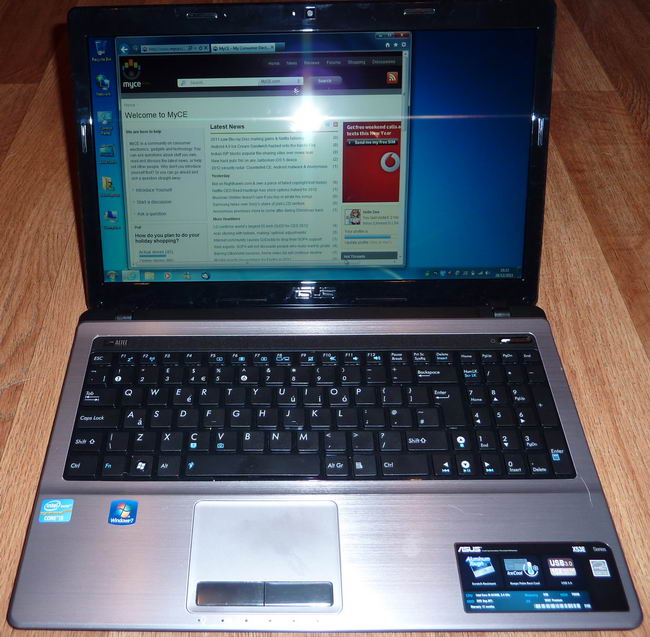
The Asus X53E SX-1186V has a 15.6 inch, 16:9 ratio LED
backlit screen with a gloss finish, and a screen resolution of 1366 x 768
pixels. The keyboard is the usual laptop affair, but in addition has a very
handy numeric keypad. We can also see a large touchpad with two buttons. We can
also see various logos, but we will cover these in the specifications.
The Asus X53E's case is made from strong aluminium.

Front
There isn’t much to see on the front of the laptop, but Asus
have included a 4 in 1 card reader.

Right hand side
On the right hand side of the Asus X53E SX-1186V we can see
the following.
- 1 – Headphone socket
- 2 – Microphone socket
- 3 – 2X USB2 sockets
- 4 – Optical drive fascia
- 5 – Optical drive activity LED
- 6 – Eject button
- 7 – Emergency eject hole
- 8 – Kensington lock
Left hand side
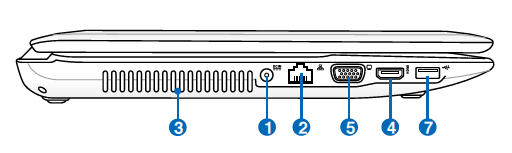
On the left hand side of the X53E we can see the following.
- 1 – Power adapter socket
- 2 – Gigabit LAN socket
- 3 – Ventilation grill
- 4 – HDMI socket (HDCP compliant)
- 5 – VGA socket
- 7 – 1X USB3 socket
Also included in the package but not shown.
- 65W UK power supply (brick type)
- 6 cell Lithium Ion 59.4 Wh rechargeable battery pack
- Quick start guide
- Instruction manual
Let’s head onto the next page where we can take a closer
look at the Asus X53E SX-1186V.....