LG N2B1DD2 Super Multi NAS with built-in Blu-ray rewriter Review

Author

MegaDETH
Senior Moderator and Senior Reviewer
Article posted 05 Nov 09 00:24

Introduction


Review: LG N2B1DD2 NAS Device
Reviewed by: MegaDETH
Provided by: LG USA


LG USA was kind enough to send us their new Super Multi NAS (Network Attached Storage) with Blu-ray rewriter device: N2B1DD2. This NAS device supports up to Two 2TB drives and comes with a built in Blu-ray recorder. The drive also supports e-SATA and USB attached storage as well as a memory card reader that supports SD, MMC, MS and XD. The N2B1DD2 can be hooked directly to a home router, switch or hub as well as a direct Ethernet connection to a desktop PC.

The new LG Super Multi NAS comes in six different models and configurations, as follow:

Super Multi NAS with Blu-ray rewriter:

  • N2B1D -> NAS with BD-RW (HDD not included)
  • N2B1DD1 -> NAS with BD-RW 1TB HDD(1TBx1)
  • N2B1DD2 -> NAS with BD-RW 2TB HDD(1TBx2)

Super Multi NAS with DVD Rewriter:

  • N2R1D -> NAS with DVD-RW (HDD not included)
  • N2R1DD1 -> NAS with DVD-RW 1TB HDD(1TBx1)
  • N2R1DD2 -> NAS with DVD-RW 2TB HDD(1TBx2)


Corporate Information:


About LG: We took a quick look at the company information found at LG Electronics USA site:

LG Electronics, Inc. was established in 1958 as the pioneer in the Korean consumer electronics market. The company is a major global force in electronics and information and communications products with more than 64,000 employees working in 76 overseas subsidiaries and marketing units around the world. With annual total revenues of more than US $16.9 billion (non-consolidated), LG Electronics comprises three main business companies: Digital Display & Media, Digital Appliance, and Telecommunication Equipment & Handset.

If you are interested in reading more about LG Electronics USA, please visit: www.lgusa.com.

Product Information:
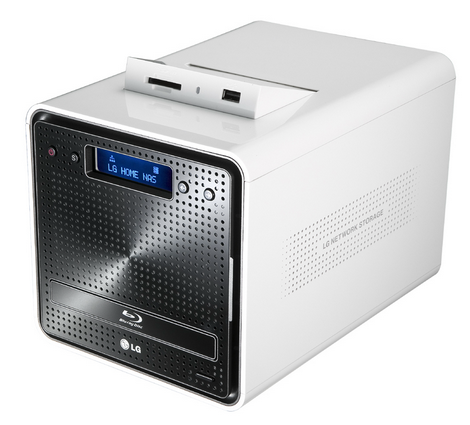

This new NAS device makes it convenient for users to keep the vital information stored on the NAS available at all times. The newly designed and stylish NAS device came pre-loaded with Two Hitachi 1TB hard drives and LG’s newest "BH10NS30" Blu-ray recorder.

It provides true combined network HDD bays and Blu-ray disc recorder support, with three USB ports and an extra e-SATA connection so you can bolt on even more storage. The Blu-ray recorder gives this device great flexibility and support for backing up your current shared storage or adding to it.


Device Specifications:
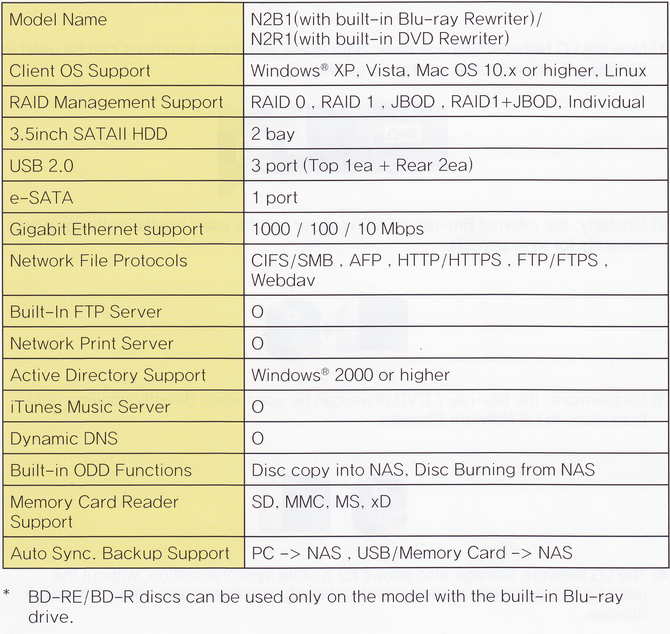

LG NAS Specifications

What’s inside the box?


The LG N2B1DD2 NAS Device we received was the Retail package.
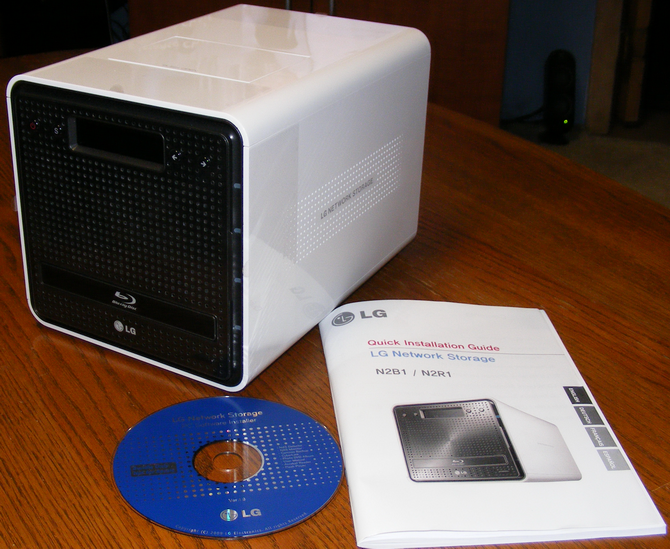

Package Contents
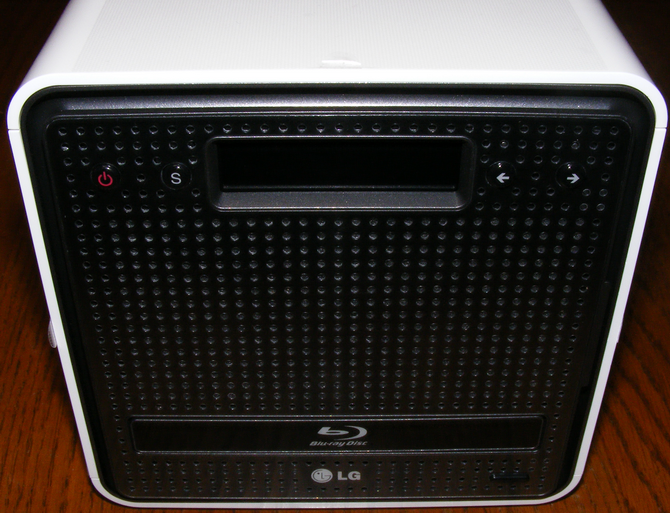
Front View Door Closed
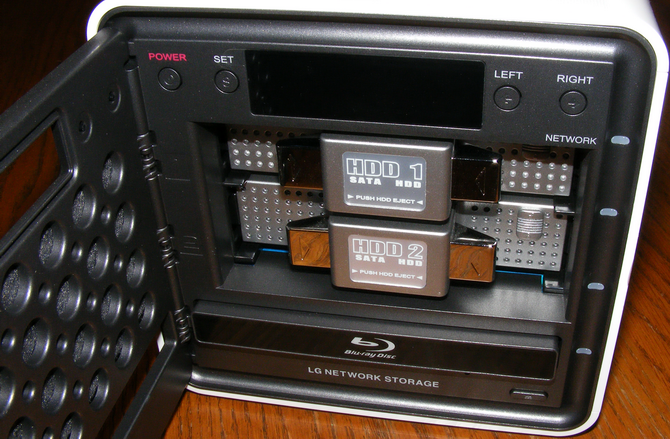
Two hard drive bays and Blu-ray recorder
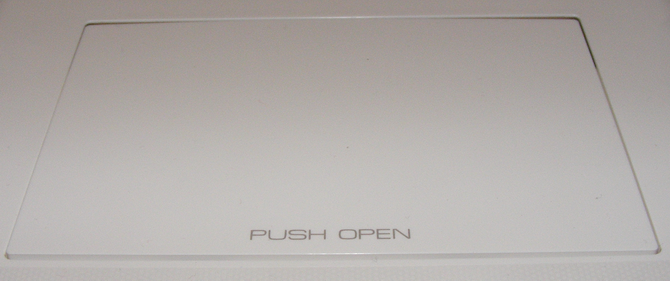
Top View Card Reader and USB ports Closed
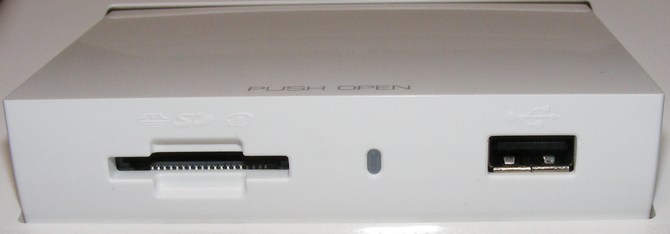
Top View Card Reader and USB ports Open
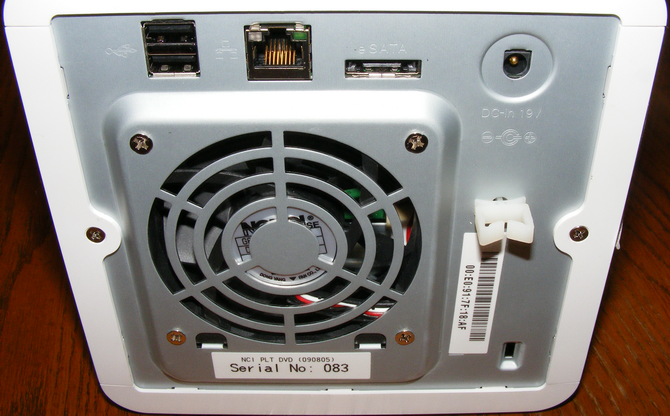
 

Rear e-SATA, Ethernet and USB ports

Let us take a look at the contents of the package…

The package includes the following items:

·         LG N2B1DD2 NAS

·         AC Power connector

·         Ethernet extension cable

·         LG NAS PC Software installer

·         LG NAS Installer
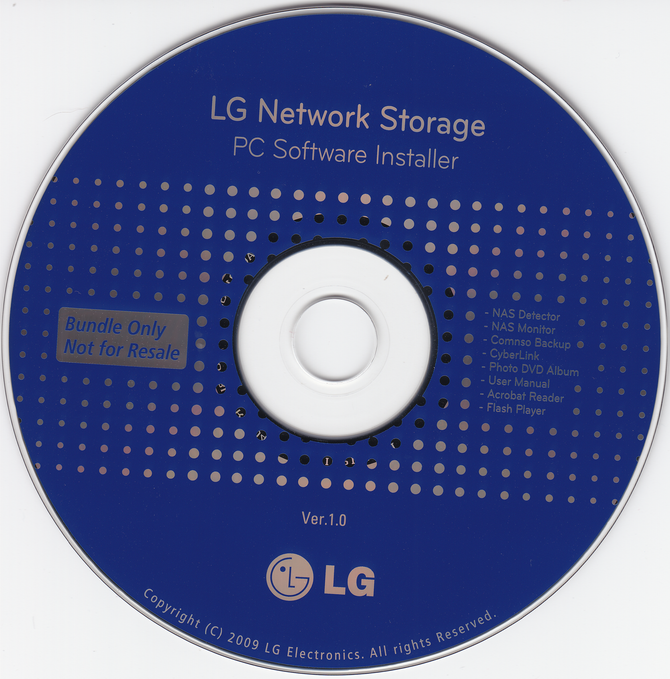
LG Network Storage PC Software Install Disc

For this review we will be using a computer with the following configuration:

Hardware:

Review PC:

·         Motherboard: Gigabyte GA-EX58-UD5      

·         Processor: Intel i7 920 @ 4.0GHz

·         Memory: 3X2GB G-Skill DDR3

·         Video: eVGA GTX 260

·         Display: 24" Acer HDMI LCD

·         Sound: Realtek ALC889A HDAudio (Onboard)

·         Hard Disks: Seagate SATA II 320GB

·         Operating System: Windows 7 Ultimate x64 Build 7229 is installed on this machine.


For this review we will have the LG NAS device hooked up through an Ethernet connection to our Linksys WRT54GL Wireless-G Broadband Router.


On the next page we will take a look at the supported features …
Do you want or have this product?

38 Comments

belrock
Posts: 1
Posted on: 29 Nov 09 15:42
hi,

is it possible to back up to an external hdd via usb or eSATA ?
MegaDETH
Posts: 4873
Posted on: 30 Nov 09 18:09
As long as the backup program you are using will recognize network drive you sure can.


Quote:
Originally Posted by belrock View Post
hi,

is it possible to back up to an external hdd via usb or eSATA ?
Duffer_1960
Posts: 2
Posted on: 08 Mar 10 21:24
Hi
I have difficulties getting the DLNA to work.
The NAS is working fine on the network. I have activated DLNA and specificed the /service/DLNA folder.
My TV is a Samsung LE40A8661W which has DLNA built-in.

The TV can find the DLNA servers on my PC, but cannot find the LG NAS DLNA.

I hope someone can help me?
MegaDETH
Posts: 4873
Posted on: 08 Mar 10 22:41
I have not tried hooking to my Plasma yet but after we did the review I had gotten a PS3.

I didn't have to do anything but enable DLNA and the PS3 picked it up and plays Video great.

You have a network and the TV plugged into the network?

Do you also have files in the /service/DLNA folder?
Duffer_1960
Posts: 2
Posted on: 09 Mar 10 19:29
Yes I have a network, with my computer the LG NAS and the TV pluged in.
Both the NAS and the TV are cabled to the router(Belkin).

I have pictures in the folder, and also a subfolder with more pictures.
I beleive the problem is in finding the LG NAS, because it is not shown in the TV's source list at all, as is my computer.
Could it be a problem with some settings in the router?
MegaDETH
Posts: 4873
Posted on: 09 Mar 10 21:56
I don't think the router has anything to do with it, well i never had to change anything.

Could be a TV setting.

Have you powered the NAS off and and back on after changing the DLNA setting?

Try and google your TV with DLNA in the search and see if anything comes up.

EDIT: Found something on google that might help you...

http://forums.cnet.com/5208-13973_10...hreadID=322480
jerryaycock
Posts: 3
Posted on: 11 Mar 10 18:53
I am using a NSLU2 now...
This sure got my attention.
debro
Posts: 12922
Posted on: 14 Mar 10 02:22
How can you do a review on a gigabit NAS without testing it with gigabit ethernet?

And why is their no comments regarding:
1) Transfer speed (MB/s) of the NAS across 100Mb/1000Mb. This is a NAS!!!! The primary function of it is to serve files across the network !!!!!!
2) Network Transfer speeds with multiple accesses (multiple users). is it good, bad, horrible? Does it affect playback of Hi Definition files from DLNA/Upnp server, and what bitrates are the tested files 40Mb/s, 50Mb/s, 10Mb/s ?
3) Where is the power consumption of this unit? Will it be better to buy a Good server case with an Intel Atom with nvidia Ion/Ion2 platform, and have more expandability with more drives?
4) Can I map NAS drives/folders in Windows/Linux/Mac without installing software - software often grants only a single user license ..... so installing this software to map drives on more than 1 PC violates the EULA turning people into pirates!
5) Does it support Jumbo Frames?
6) Does it do NFS?
7) What partition formats does it recognize for external storage drives plugged into it - NTFS/ Fat32/ EXT2-3-4?
8) What formats does the DLNA server support? Does it support the PS3/Xbox360, and what formats are picked up by this unit?
9) How much ram/cache does it have? What are the HDD's that come with it? What speed (RPM) are the drives? Did the author try any other drives, and did it makes any difference?
10) Does it support multi-user? Can folders be assigned different security levels for different users, and how customisable is this?
11) Were there any problems noticed with the networking? Any file aborts, slowdowns - etc/etc.
12) When transferring files from USB - HDD, what's the speed, is it quick & easy?
13) What's the internal transfer speeds - HDD to HDD?
14) Can I replace the ODD with another ODD - Can it be another manufacturer's Drive? Can I retrofit a BDRE drive into the DVDRW version of the NAS?
15) Upgrading HDD's -> What partition/file-system format are the HDD's? This is particularly relevant if the system breaks down, can we just throw together a Windows/Linux PC, and start sharing these drives, or are they some sort of proprietary format? Which OS must be used? Is it an easy process to upgrade these drives? How flimsy are the connectors, are the drives easy to remove?
16) Can the Esata/USB be used simultaneously? How do you access these on the network? Can these be mounted on an existing directory on the Mounted HDD's? Are there any limitations to the recognized file system formats (ie, limited to Fat32/4GB file sizes?)
17) HDD power/spin-down settings?
18) DDNS support? Can I access this unit from a WAN/internet?
Who's ever heard of a NAS with an optical drive? That's a bonus to a NAS, and not the primary function. This review totally misses the point of a NAS!!!

I now find myself in the position that after this review, I'm looking for OTHER reviews to get the information I want.
Bob
Posts: 17882
Posted on: 14 Mar 10 15:13
dang debro are you sure you read the review? lol
debro
Posts: 12922
Posted on: 14 Mar 10 22:49
Quote:
Originally Posted by Bob View Post
dang debro are you sure you read the review? lol
All 3 pages of it :|
The reviews I read for my current NAS, I bought about 2-3years ago, I read about 10 reviews, along with a few weeks of user opinions, and the reviews generally had less pictures, and alot more pages.

At any rate, the no# of reviews available for this unit is pretty small, so the rate of uptake for this NAS is pretty low, so I'd expect it's a low-end consumer grade NAS with a gimmick, and it can't compete with the big boys of the NAS world.

Nuff said :|
Bob
Posts: 17882
Posted on: 15 Mar 10 13:23
ya i just meant that was a pretty large list you have.
MegaDETH
Posts: 4873
Posted on: 15 Mar 10 15:39
If I do a NAS review again I will get together with you on MSN and we can go over what you would like to see run.


Quote:
Originally Posted by debro View Post
All 3 pages of it :|
The reviews I read for my current NAS, I bought about 2-3years ago, I read about 10 reviews, along with a few weeks of user opinions, and the reviews generally had less pictures, and alot more pages.

At any rate, the no# of reviews available for this unit is pretty small, so the rate of uptake for this NAS is pretty low, so I'd expect it's a low-end consumer grade NAS with a gimmick, and it can't compete with the big boys of the NAS world.

Nuff said :|
mister9
Posts: 2
Posted on: 16 Mar 10 22:38
I just joined to say that I found your review very helpful. Of course there's always more to be done but I just wanted to say thank you! (As Fed Ex rolls by while I'm impatiently waiting for UPS)
Gilso
Posts: 1
Posted on: 17 Mar 10 18:22
Good review but could you tell me what it's transfer speed is like for files across a network and where you using a 100Mb or 1000Mb network. Thanks.
debro
Posts: 12922
Posted on: 17 Mar 10 23:35
Linky.
Quote:
Originally Posted by debro View Post
How can you do a review on a gigabit NAS without testing it with gigabit ethernet?

And why is their no comments regarding:
1) Transfer speed (MB/s) of the NAS across 100Mb/1000Mb. This is a NAS!!!! The primary function of it is to serve files across the network !!!!!!
2) Network Transfer speeds with multiple accesses (multiple users). is it good, bad, horrible? Does it affect playback of Hi Definition files from DLNA/Upnp server, and what bitrates are the tested files 40Mb/s, 50Mb/s, 10Mb/s ?
3) Where is the power consumption of this unit? Will it be better to buy a Good server case with an Intel Atom with nvidia Ion/Ion2 platform, and have more expandability with more drives?
4) Can I map NAS drives/folders in Windows/Linux/Mac without installing software - software often grants only a single user license ..... so installing this software to map drives on more than 1 PC violates the EULA turning people into pirates!
5) Does it support Jumbo Frames?
6) Does it do NFS?
7) What partition formats does it recognize for external storage drives plugged into it - NTFS/ Fat32/ EXT2-3-4?
8) What formats does the DLNA server support? Does it support the PS3/Xbox360, and what formats are picked up by this unit?
9) How much ram/cache does it have? What are the HDD's that come with it? What speed (RPM) are the drives? Did the author try any other drives, and did it makes any difference?
10) Does it support multi-user? Can folders be assigned different security levels for different users, and how customisable is this?
11) Were there any problems noticed with the networking? Any file aborts, slowdowns - etc/etc.
12) When transferring files from USB - HDD, what's the speed, is it quick & easy?
13) What's the internal transfer speeds - HDD to HDD?
14) Can I replace the ODD with another ODD - Can it be another manufacturer's Drive? Can I retrofit a BDRE drive into the DVDRW version of the NAS?
15) Upgrading HDD's -> What partition/file-system format are the HDD's? This is particularly relevant if the system breaks down, can we just throw together a Windows/Linux PC, and start sharing these drives, or are they some sort of proprietary format? Which OS must be used? Is it an easy process to upgrade these drives? How flimsy are the connectors, are the drives easy to remove?
16) Can the Esata/USB be used simultaneously? How do you access these on the network? Can these be mounted on an existing directory on the Mounted HDD's? Are there any limitations to the recognized file system formats (ie, limited to Fat32/4GB file sizes?)
17) HDD power/spin-down settings?
18) DDNS support? Can I access this unit from a WAN/internet?
Who's ever heard of a NAS with an optical drive? That's a bonus to a NAS, and not the primary function. This review totally misses the point of a NAS!!!

I now find myself in the position that after this review, I'm looking for OTHER reviews to get the information I want.
1)
Quote:
Originally Posted by linky
Average RAID 1 write performance using a Gigabit Ethernet connection was 37.7 MB/s for file sizes between 32 MB and 4 GB, with cached behavior not included in the average calculation. Average RAID 1 read performance was lower, measuring 31.6 MB/s with the same conditions.
File copy performance using a Vista SP1 client under the same conditions (RAID 1, Gigabit LAN) measured significantly lower for write at 17.4 MB/s, but higher for read at 40.9 MB/s.
2) T.B.D.

3)
Quote:
Originally Posted by linky
The N2B1 NAS has both a Standby mode, configurable for 10, 30, 60 or 120 minutes, as well as a scheduled Hibernate mode. In standby mode, which spins down the drives, power consumption is reduced by about 50%, from 24 W to 9 W. It takes between 3 and 15 seconds to come out of standby mode. Hibernate mode further reduces power draw down to around 6W. Hibernate mode can be terminated by web access with administrator credentials or from the front panel.
Ion's generally chew up about 24-50W which adds $XX to an annual energy bill. Ion boards generally only support upto 4 devices (some upto 6), but may have a PCI/PCI-E slot which can be used to add more. Note that in most cases, ION boards include realtek network chips which have been noted as providing poor network throughput, and the PCI/PCI-E expansion slot may be needed for an intel network card to improve throughput.

4) Yes .. standard Samba.

5)
Quote:
Originally Posted by linky
A number of my complaints are fairly minor, and could undoubtedly be fixed with a firmware upgrade. For example, the N2 doesn't support jumbo frames
6)
Quote:
Originally Posted by linky
NFS isn't supported, so Linux clients will need to connect to SMB-shared folders.
Note that Samba performance is distinctly slower (and occasionally flaky) compared to NFS in linux.

7) T.B.D.

8) DLNA/UPNP server doesn't work in this unit.

9)
Quote:
Originally Posted by linky
The N2 is powered by the slowest version of Marvell's 88F6192 "Kirkwood" CPU running at 800MHz along with 128 MB each of RAM and flash. Other key components include a Marvell 88E1116-R for Gigabit Ethernet, D78F0535 8 bit microcontroller, NEC 720114 4 port USB 2.0 hub and Marvell 88SM4140 SATA Port multiplier.
10)
Quote:
Originally Posted by linky
The Share menu allows you to create users and groups, set up folders, enable services for folders, create shared folders, and create access restrictions for folders. Access control is available only for top level folders, and is disabled by default. Unless you explicitly enable access controls, all users have full rights to all volumes. There's relatively little control available, however. You can't for example, set user storage quotas.
11) T.B.D.

12) T.B.D - Esata didn't work.

13) T.B.D.

14) T.B.D.

15) T.B.D.

16) Esata didn't work. T.B.D.

17) Standby (10, 30, 60 or 120 minutes) & Hibernate.

18)
Quote:
Originally Posted by linky
Remote Access - The N2B1 NAS supports only LG's own DDNS (Dynamic Domain Name Service) so you can't really configure the device to be a remote resource on your own domain - at least not easily. To set up remote access, you enable the DDNS feature and enter in a user name and password. This creates a sub-domain on lgnas.com. Oddly, if you disable DDNS for some reason, you can't re-enable it with the name you originally used - you must create a new name.
In my testing, I found that setting up the service or even going to the remote access page often resulted in a "loading" icon that occasionally timed out. Ultimately, I was able to configure the DDNS setting, and the page showed the correct public IP address for my network as shown in Figure 6.
Commentary: The LG N2B1 seems to be prety standard for a NAS unit, with approximately 17MB/s Read for a single drive (or Raid1 configuration), and upto 31MB/s Read for a striped (Raid0 configuration). These results are for sustained file reads (lagre files) that will not fit into the NAS's RAM. Small writes less than 64MB will read & write at speeds of upto 55MB/s & 80MB/s respectively due to the NAS's caching.

Miscellaneous note: Single drive NAS performance is limited to approximately 67MB/s for single drive NAS configurations and <100MB/s for professional raid setups. Generally, commercially available NAS setups are limited to 17-25MB/s (read) for single drive configurations, and 30-50MB/s for performance raid configurations.

By comparison, a Windows XP (pro) PC to Windows XP (pro) PC transfer from the server (using a realtek network chipset) resulted in 18MB/s transfer speed for reading, and 10-12MB/s writing speed across a gigabit network link. (2.5GB file tested using XXCOPY with a mapped network drive).

Similarly, various flavours of linux result in hitting the single drive 17MB/s read (9MB/s write) in server (realtek onboard nic) to Windows XP (pro) PC. (2.5GB File Tested using XXCOPY with a mapped network drive).

To be tested is intel Nic's which actually have a network processor onboard, compared to marvell & realtek, where all network activities are done in software (CPU) which can greatly increase network throughput.

Anecdotal evidence suggests that realtek peak at 30MB/s transfer speeds, Marvell achieve 35MB/s, whereas an intel card will achieve upto 55MB/s in the same setup.
mfalcon
Posts: 2
Posted on: 28 Mar 10 22:25
This is truely a great unit will all the bells and whistles. I've gotten all features to work consistently, except for DLNA. My Samsung LNB46 HDTV sees all my other DLNA sources except the LG-NAS (firmware: 2450). My WDTV Live and a small iPOD app sees the LG-NAS OK.

Samsung and LG Tech support have not been able to figure this out so far. Does anyone have any clues to true DLNA compatiblity?

Thanks,
/\/\att
MegaDETH
Posts: 4873
Posted on: 29 Mar 10 22:50
A few months after posting the review I had gotten a PS3 and Panasonic 42" Plasma.

The DLNA works perfect through the PS3, plays most AVI and MKV I have tried as well as MP3.


Quote:
Originally Posted by mfalcon View Post
This is truely a great unit will all the bells and whistles. I've gotten all features to work consistently, except for DLNA. My Samsung LNB46 HDTV sees all my other DLNA sources except the LG-NAS (firmware: 2450). My WDTV Live and a small iPOD app sees the LG-NAS OK.

Samsung and LG Tech support have not been able to figure this out so far. Does anyone have any clues to true DLNA compatiblity?

Thanks,
/\/\att
joeadvfn
Posts: 3
Posted on: 02 Apr 10 14:33
I am having loads of problems with the setup of my nas drive.
Firstly I have had loads of issues with the NAS printer freezing and then when it restarts it keeps printing the same document over and over. I have tried cancelling all documents yet it seems to ignore this command. It's driving me nuts and I have had to unplug the printer from the network as I ccan't seem to stop it.

When I click on the 'file viewer' button it opens up ajaXplorer and not the LG software window that you show in your review picture. Why is this?

I have upgraded the firmware to 1.0.0_2450 so is this casuing the problem?
mister9
Posts: 2
Posted on: 02 Apr 10 18:15
Quote:
Originally Posted by joeadvfn View Post
I am having loads of problems with the setup of my nas drive.
Firstly I have had loads of issues with the NAS printer freezing and then when it restarts it keeps printing the same document over and over. I have tried cancelling all documents yet it seems to ignore this command. It's driving me nuts and I have had to unplug the printer from the network as I ccan't seem to stop it.

When I click on the 'file viewer' button it opens up ajaXplorer and not the LG software window that you show in your review picture. Why is this?

I have upgraded the firmware to 1.0.0_2450 so is this casuing the problem?
What router are you using? Are you using Windows 7? I have the same issue with my fiance's laptop (Dell Studio 1555), the only thing is the printer is not connected through the N2B1- I have it connected directly into the back of the Airport Extreme Base Station 802.11n. The printer not only loops printing but gives it weird @$$ justification and what should be at the top ends up in the middle and the bottom rolls over to the next page. The printer works fine for me though (Macbook Pro1,1). I haven't been able to figure it out myself, it would be interesting to hear your setup though and maybe we can draw some conclusions.

Has anyone gotten other software to recognize the bluray drive and burn BD's with it?
joeadvfn
Posts: 3
Posted on: 04 Apr 10 13:03
I am using a netgear wpn 824 wireless router. The printer is a canon pixma mp780 and it is plugged directly into the back of the n2b1 via the usb port. I think I am going to have to uninstall the printer from the network completely and reset the n2b1 to solve this issue. Do you have the ajaXpress software loading when you click on the lg file viewer?
MegaDETH
Posts: 4873
Posted on: 04 Apr 10 16:49
No ajaXpress software on my system. I had never heard of it before you mentioned it.

My printer though I had connected to another PC and not the NAS.


Quote:
Originally Posted by joeadvfn View Post
I am using a netgear wpn 824 wireless router. The printer is a canon pixma mp780 and it is plugged directly into the back of the n2b1 via the usb port. I think I am going to have to uninstall the printer from the network completely and reset the n2b1 to solve this issue. Do you have the ajaXpress software loading when you click on the lg file viewer?
joeadvfn
Posts: 3
Posted on: 05 Apr 10 00:17
That's weird then because it definitely came with my NAS software disc.
MegaDETH
Posts: 4873
Posted on: 22 Apr 10 17:48
Don't forget this review is over a year old now so software must have changed.
debro
Posts: 12922
Posted on: 23 Apr 10 01:39
Quote:
Originally Posted by MegaDETH View Post
A few months after posting the review I had gotten a PS3 and Panasonic 42" Plasma.

The DLNA works perfect through the PS3, plays most AVI and MKV I have tried as well as MP3.
How does your PS3 play MKV from the NAS?
The PS3 doesn't support MKV, unless the NAS is repackaging it as a m2ts or similar.

I didn't realise NAS mobs were getting involved in transcoding .....
MegaDETH
Posts: 4873
Posted on: 23 Apr 10 14:22
The PS3 plays pretty much all MKV files I have tried even through the NAS with no problems using DLNA.

I also us PS3 media server from my computer and I don't have to use any of the encoding options to play them.


Quote:
Originally Posted by debro View Post
How does your PS3 play MKV from the NAS?
The PS3 doesn't support MKV, unless the NAS is repackaging it as a m2ts or similar.

I didn't realise NAS mobs were getting involved in transcoding .....
freediving
Posts: 1
Posted on: 15 May 10 20:10
When you say no Wireless LAN support, does that mean this NAS can't be access wirelessly on your network?
debro
Posts: 12922
Posted on: 16 May 10 04:00
Quote:
Originally Posted by freediving View Post
When you say no Wireless LAN support, does that mean this NAS can't be access wirelessly on your network?
The NAS has no wireless integrated into the unit.

You will need a wireless Access Point, or a Wireless Router to get the wireless clients to connect onto the wired network, and hence the wired NAS.
mfalcon
Posts: 2
Posted on: 17 May 10 02:17
Has anyone had success with connecting a Samsung LCD TV to the LG NAS? Every other viewing device sees the LG, except for my Samsung LN46B650.
Johlin
Posts: 1
Posted on: 19 May 10 14:14
Quote:
Originally Posted by mfalcon View Post
Has anyone had success with connecting a Samsung LCD TV to the LG NAS? Every other viewing device sees the LG, except for my Samsung LN46B650.
I'am having the same problem. I have the LG N2R1DD1 and the Samsung UE55B7070 (UExxB7000 series)
geekmachine
Posts: 1
Posted on: 03 Jun 10 14:33
Hi,

What is the native file format for the device? I see it supports various formats but is the device OS linux based etc?

I have 2 1TB drives that I used with my NSLU2 (EXT3 format) but it's time to upgrade. I would like understand compatability with installing used drives and file/folder permissions etc.

I would like to avoid formatting the drives or having to play with permissions etc if possible. From the looks of the device it seems to all be there but this is something which I don't think is covered or perhaps I've overlooked..

Thanks.
kidguitar
Posts: 1
Posted on: 14 Jul 10 10:37
I just bought the N2B1DD2. I can't get uPnP to work with my U-verse 2wire resident gateway model # 3800HGV-B. I tried to assign port 80 manually in the RG but that didn't work. Any thoughts out there, or is this NAS limited to "only" uPnP configurations? tks!
efl7377
Posts: 1
Posted on: 13 Aug 10 11:04
If I hook up the N2B1DD2 to a tv that supports DLNA can I watch a film directly from the Blu Ray writer or do I have to copy the film to the Hard disk?

regards, Sotos
blu4ce
Posts: 2
Posted on: 19 Aug 10 18:24
I have hooked up a N2B1DD1 to my network and added it to my Active Directory for file sharing in my small workgroup. Is it possible or am I missing something in the setup, but what I want to do is create folders on the fly using Windows Explorer and set permissions through folder properties. Using the Web interface to the NAS directly, I set domain administrators to have read/write access for the folder.

Also, I've noticed that using the web interface on the NAS, you can only set permissions for the top level folders. I cannot seem to figure out how to add nestled folders and set permissions for those folders as well....

Any help would be appreciated.

Cordially, Mike
Dee
Posts: 11995
Posted on: 19 Aug 10 18:31
Welcome to the forum, blu4ce
I'm not saying this the case for LG NAS, but normally you would need to add a user group and then add a user to that group, then set permissions. Then adding folders to that group should allow it to be browsed and maintained in Windows explorer.
blu4ce
Posts: 2
Posted on: 19 Aug 10 19:00
In the folder setup on the LG NAS, it allows for read/write or read only permission setting for Domain Users and or Domain Groups... If its joined to the Domain, the I would think that the users or groups permissions on the domain would prevail.... it seems that even though it is in the domain, it still wants to dictate permissions and not let the domain control permissions.
NunyaBusiness
Posts: 1
Posted on: 10 Sep 10 19:11
I don't understand how I'm supposed to add files to the iTunes server. The documentation doesn't explain this and your example above makes it sound like it is obvious. I tried dropping files in the folder /service/iTunes, but it is read only.

If anyone has a clue on what I need to do please let me know.

Also, what is the advantage of using the iTunes server vs. just creating a folder on the NAS and mapping a drive on your PC to that folder and pointing iTunes there?? That is what we did on my last NAS for 6 years and it worked just fine.
Noir_Magnus
Posts: 1
Posted on: 07 Dec 10 17:36
Quote:
Originally Posted by MegaDETH View Post
The PS3 plays pretty much all MKV files I have tried even through the NAS with no problems using DLNA.

I also us PS3 media server from my computer and I don't have to use any of the encoding options to play them.
pls, how did you get he lg nas to stream mkv's to the ps3 thru dlna. My ps3 cannot see mkv files thru dlna.
m3nta7
Posts: 1
Posted on: 26 Sep 11 23:37
I might have missed this.

Is it easily compatible to read a Blu-ray data disk on my Windows 7 PC that was burned on the NAS? and vice versa? My main usage would be for computer data backups.

Post a comment

Hello guest,
default
To benefit from all extra features you need to log in or sign up.

About this category

Network Storage (NAS)

  • Network Attached Storage (NAS) are storage devices that are connected to your (local home) network. In this way anybody in your home/office can use it to store and share data. NAS devices are also a great place to back-up every computer in your house, provided you pick one with enough storage capacity. Some more advanced NAS devices are even able to act as a audio/video streaming device.More about this

About this product

LG N2B1D
Average user rating
Based on 0 user reviews
All LG N2B1D information