Nero 11 Platinum, a quick preview

Author

Vroom
Senior Moderator and Reviewer
Article posted 15 Oct 11 13:57

Review: Nero 11 Platinum HD
Reviewed by: Vroom
Provided by: Nero AG

Nero AG was kind enough to send us copy of their latest software for a quick preview, Nero 11 Platinum. For more info about Nero you can visit their website.

Nero 11 Platinum is the next step from the previous release that MyCE had reviewed. Nero 11 Platinum offers all the options that we are used to and some new ones, but one of the main improvements comes with the support of HD. You can get the full HD experience with Nero 11 Platinum HD on playback, video editing and also converting videos. Also there is support for smartphones that have the Android OS.

Before we get started with the preview I need to say that on this preview I will be just giving a quick look at nero 11 platinum and not doing a full review. Hopefully you’ll get an idea of what nero 11 platinum has to offer.
 

Installation

Installing Nero 11 is a very simple procedure. In our case we had one single file (1GB Size) that we simply ran and installed. We will looking at some screenshots from the installation.
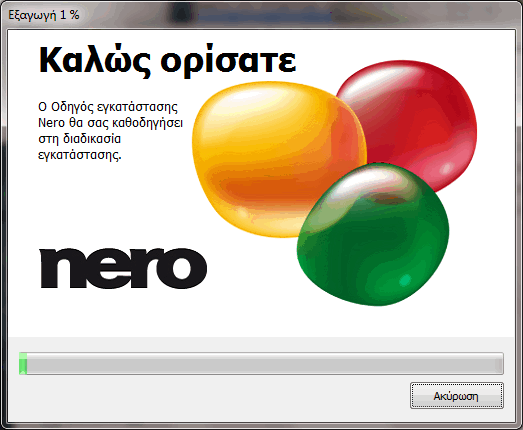
The installer detected my default language and automatically started the installation in Greek. The rest of the screen shots will also be in Greek as I wasn’t able to find a way to change it
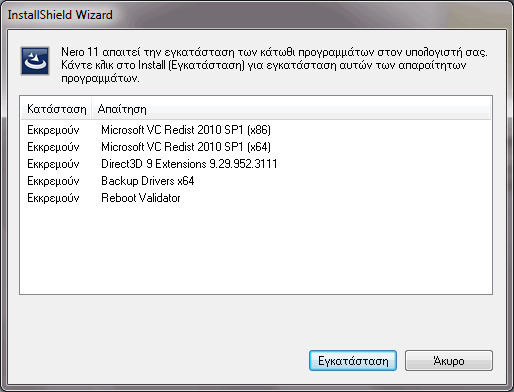
Some additional software that was required was automatically downloaded and installed, after this step a reboot was required.
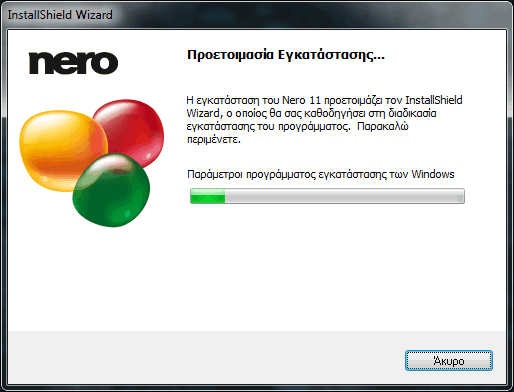
After the reboot the installation continued, and we were asked to insert the serial number of the product and also accept the licence agreement for the installation to continue.
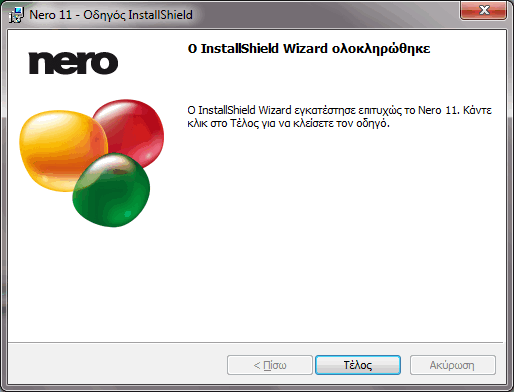
After a few minutes the installation is finished and Nero 11 Platinum is ready to be used.

Kwik


Kwik is the media player on nero 11. With Kwik you can watch movies, listen to music and view pictures, some more info about kwik can be found here. Now let’s take a brief look at the Kwik media player.
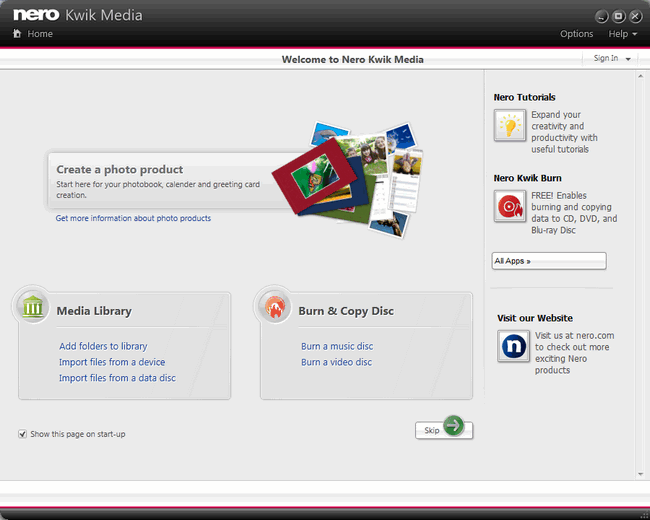
This is the first page of Kwik media, where you can create a photo calendar, import files to library and burn discs. So we simply click on Skip and we can now go ahead to the main program.

The main window is simple and you can access your media and create playlists or slide shows. You can burn or share your media on My Nero, YouTube, Flickr and Facebook. You also can have access to the nero market that will enhance your experience with nero 11.
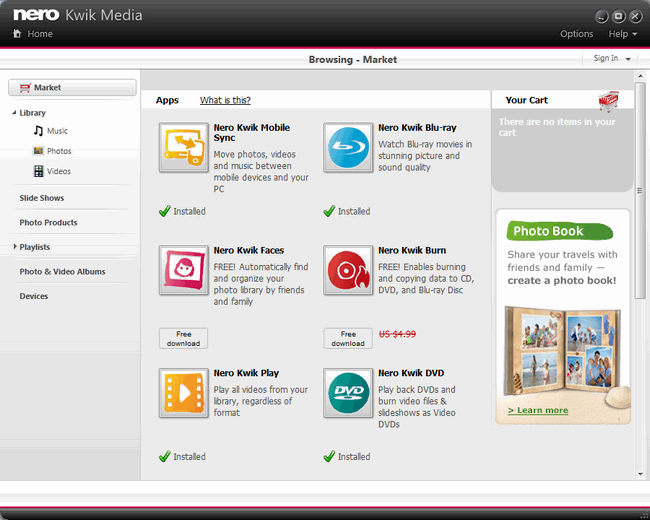
Here is a quick view of the Market.

Backitup


Nero Backitup continues to be a very easy way of backing up your data. A more detailed view can be found here.
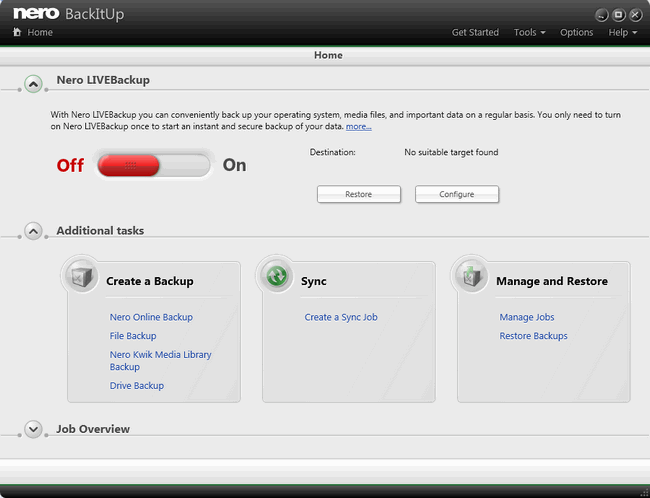
The main screen of nero 11 BackItUp. The first thing that we notice is Nero LIVEBackup, you won’t have to worry about your backups, all you have to do is select the destination drive, the drive that you want to backup, and finally set how often you want the files to be backed up, the default value is 2 hours but you can change this.  A very useful feature. There are also ways to manually backup drives/partitions and files/folders. You can also Restore your backups.

Nero Burning Rom


Nero Burning Rom hasn’t changed, and that’s a good thing. Everything that we got used to is still there, with some improvements.
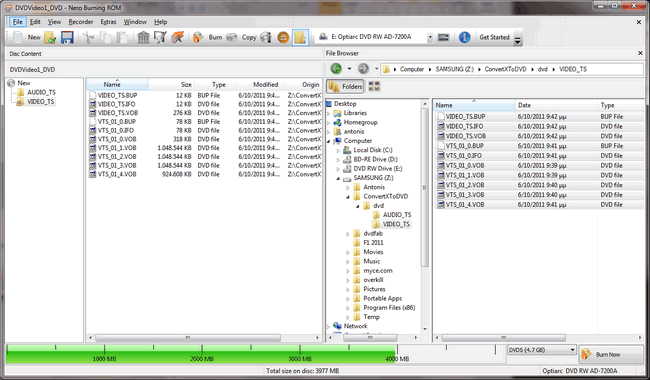
As we can see not much has changed in appearance. The DiscSpan function that was introduced in nero 10 is there, and there is also one new button.

It’s the nero Media Browser. When you click on it a new windows appears and you can choose what files you want to add to your compilation.
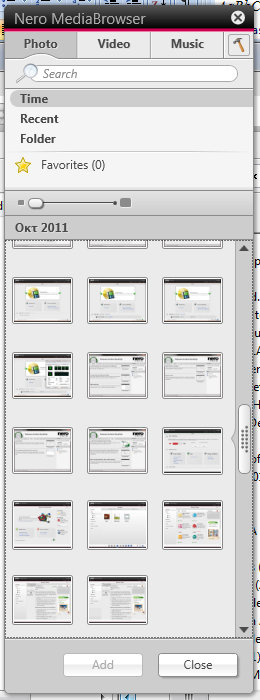
This is what you will see when you will click on the nero Media Browser.

Nero Recode & Video


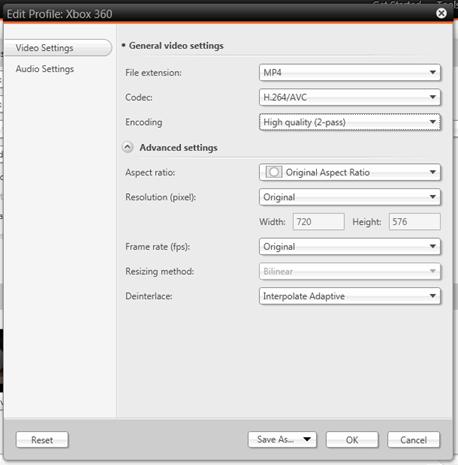
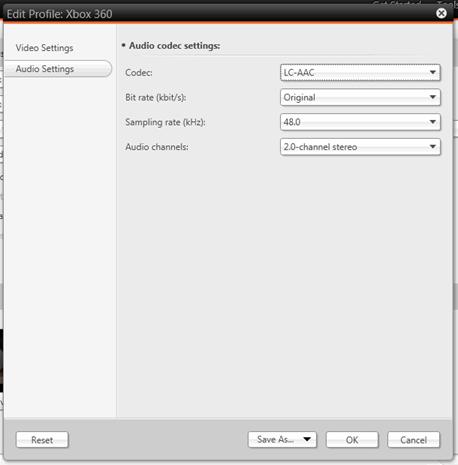
Nero recode is another program in this suite that has been heavily updated. Now you have many more options to choose, you can convert DVDs and HD material to another format. There are also some more options to convert files to enable them to be played on an iPad, ipod, iPhone, PS3, Xbox 360, PSP or you can manually create new profiles and save them. Nero Recode is able to take full advantage of all CPU cores and also all the latest acceleration that modern graphic cards can provide, such as NVIDIA CUDA, AMD App Accelerator and Intel Quick-Sync-Video.

Here is what see on the first screen of nero Recode. Three main options are Drag-and-drop, Recode discs and Convert media files. Now let’s take a look at the settings.

The Video Settings have almost everything that you need for your everyday use, and also you can save the changes that you made in a new profile.

Nero Video

Nero Video will allow you to make a DVD or a Blu-Ray disc look more professional with menus and effects. You can also capture, manageand author your own videos. Again you can take full advantage of NVIDIA CUDA, AMD App Accelerator and Intel Quick-Sync-Video.
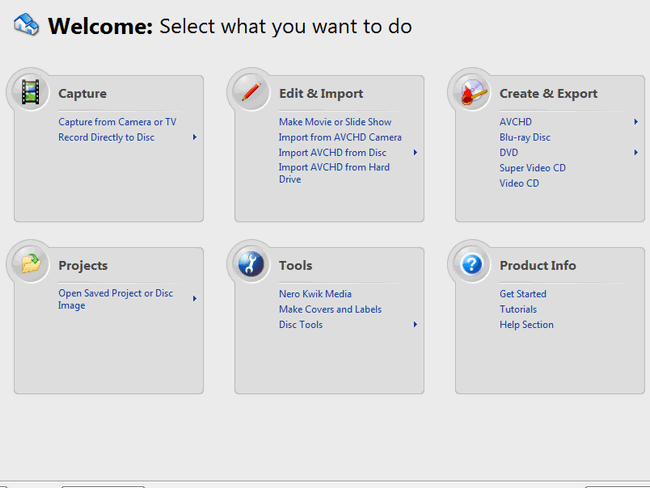
The welcome screen gives you the option of choosing what you want to do.

Clicking on ‘Make Movie or Slide Show’ will ask you to set the video format, resolution and audio. After that you click OK and you will be in the main window of the program.
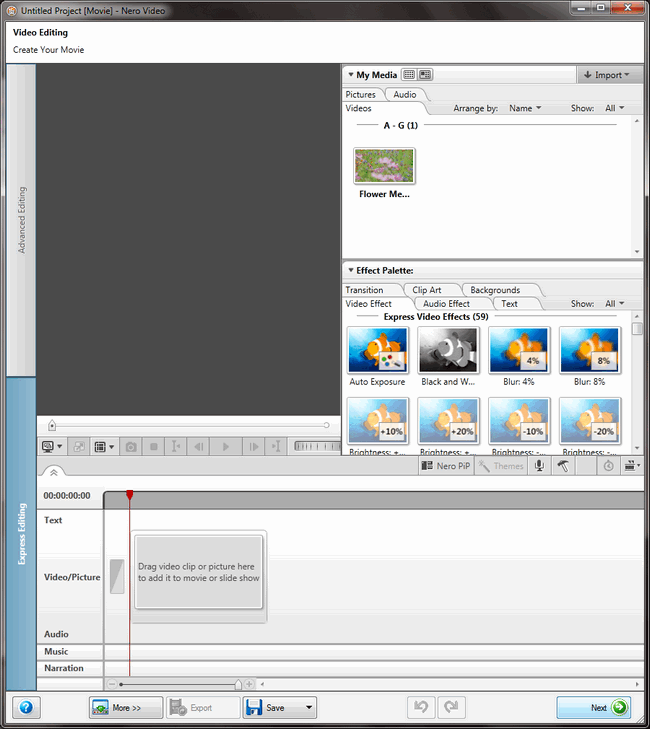
This is express editing mode, and an easy way for users that simply want to add some effects to their movies. There is also an Advanced editing option that will allow you to have more control over your videos.
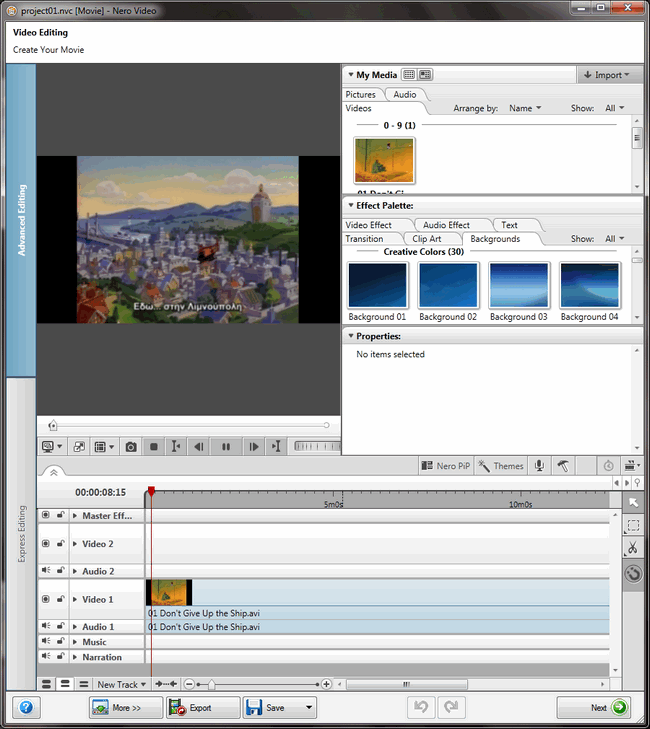
Here’s what the advanced editing screen looks like. For more info on nero Video you can click here.


Conclusion

Again we finish this preview with only positives. Everything has been improved, especially the video and recode software. Nero 11 platinum can offer almost everything that you will need to make your life easier and also take full advantage of most of the modern hardware.

“Overall nero 11 platinum is a step forward from nero 10 and it’s one of the best multimedia suites you can get.” Again I will be giving the excellent rating and the editor’s choice award.


27 Comments

Anthony1uk
Posts: 363
Posted on: 15 Oct 11 23:35
I am surprised this got an excellent. I have not read the whole review (and know I should).

But I have not used Nero since v6 which was fantastic but was forced to stop as it did not support XP service pack 2.

v7 was considered massive bloatware compared to v6 and also caused conflicts to other apps due to an application that got installed with it. I tried installing a custom version of nero lite (that was made by enthusiast not Nero themselves) just to install without those conflicting apps.

Then just figured what's the point in doing all that when Nero should do it themselves and stuck with Imgburn for everything from then on in.

Another thing annoying about Nero is that DVDshrink; probably the greatest DVD reauthering app ever made, Nero bought the app rights and then released one version of it incorporated into Nero 7 (and then never once updated the app after that one release).

Looking at the screenshots it looks overcomplicated to what Imgburn does easy and for free.
coolcolors
Posts: 5973
Posted on: 16 Oct 11 03:49
Same here I stopped using Nero after Nero 6 which was a great program and thought Nero 9 could be better but no it was worse it stole most of my custom file extension without even telling me and changed my file associations and was at time so bloated and slow. I just removed it and put Nero 9 in the scape heap to never install it again. I now am forced to but unfortunately to use Foobar to do my mp3 to cd writing after using winamp to rip my cd to mp3. Which so far has worked and happy for somewhat that winamp is still a viable program compared to the downhill side Nero is doing now. Nero 6 was probably their last and greatest program that will never be repeated again.
alan1476
Posts: 17234
Posted on: 16 Oct 11 17:13
Nero was actually getting better with their latest releases but I wont upgrade from 10 to 11 without some sort of amazing changelog.
olyteddy
Posts: 5630
Posted on: 16 Oct 11 19:01
It says it plays BluRay, and at $109 might be a bargain for that feature.
nmharleyrider
Posts: 7
Posted on: 16 Oct 11 19:38
Well of course there is a huge difference between Nero and Imgburn. I use imgburn all the time when I'm creating ISO files from dvds or creating dvds from ISo files but let's face it, it's functions, while very good, are very few. With Nero you can do so much more; it's a full-featured media suite not a single function program like Imgburn. You can create menus, merge files together, edit video, play video, and do all sorts of other things that Imgburn cannot do as it was not intended do do those functions. I agree that earlier versions had their problems although I have been using Nero8 for some time now with great success and I am now upgrading to nero11 to get the HD capability.
Quote:
Originally Posted by Anthony1uk View Post
I am surprised this got an excellent. I have not read the whole review (and know I should).

But I have not used Nero since v6 which was fantastic but was forced to stop as it did not support XP service pack 2.

v7 was considered massive bloatware compared to v6 and also caused conflicts to other apps due to an application that got installed with it. I tried installing a custom version of nero lite (that was made by enthusiast not Nero themselves) just to install without those conflicting apps.

Then just figured what's the point in doing all that when Nero should do it themselves and stuck with Imgburn for everything from then on in.

Another thing annoying about Nero is that DVDshrink; probably the greatest DVD reauthering app ever made, Nero bought the app rights and then released one version of it incorporated into Nero 7 (and then never once updated the app after that one release).

Looking at the screenshots it looks overcomplicated to what Imgburn does easy and for free.
alan1476
Posts: 17234
Posted on: 17 Oct 11 00:02
Quote:
Originally Posted by olyteddy View Post
It says it plays BluRay, and at $109 might be a bargain for that feature.
Cyberlink and Arcsoft both do that very well for much less, thats not to say that Nero is not worth the money, I just doubt that at this cycle of DVD usage Nero is not what it used to be. JHMO.
deanwitty
Posts: 1547
Posted on: 17 Oct 11 00:29
Thanks for the review, vroom

Quote:
Originally Posted by olyteddy View Post
It says it plays BluRay, and at $109 might be a bargain for that feature.
I know at least one person who would likely be willing to pay Nero to keep their program rather than use it for Blu-ray playback . Spent more than a few minutes trying to help a member figure out why his BDrebuilder backup only played back in foreign language. Nero platinum 11 turned out to be the culprit. The Bluray playback software in the package is seriously crippled by it's inability to play any HD audio formats. Also not capable of 3D playback http://www.nero.com/enu/support.html...%3Btrigger%3A1 . Buy it for it's other features, but do not think you're getting real BD playback as a bonus. It does not in fact support full HD playback.
coolcolors
Posts: 5973
Posted on: 17 Oct 11 03:23
Quote:
Originally Posted by alan1476 View Post
Nero was actually getting better with their latest releases but I wont upgrade from 10 to 11 without some sort of amazing changelog.
hmm ok...well then that a refreshing to know..but does 10 or 11 steals or not let me when I am installing determine what files to associate with nero or does it do it without my knowledge only to find out later that the file associated with another apps is now properly of nero and will always open with nero when I click on it? That will to me determine if I will buy nero 11 or not...If some currently has Nero 10 or 11 full or plat version installed can they tell me if the lost their file association or does it let you pick and choose what file extensions to go with the latest Nero product???
CDan
Posts: 3761
Posted on: 17 Oct 11 05:45
Quote:
Originally Posted by coolcolors View Post
hmm ok...well then that a refreshing to know..but does 10 or 11 steals or not let me when I am installing determine what files to associate with nero or does it do it without my knowledge only to find out later that the file associated with another apps is now properly of nero and will always open with nero when I click on it? That will to me determine if I will buy nero 11 or not...If some currently has Nero 10 or 11 full or plat version installed can they tell me if the lost their file association or does it let you pick and choose what file extensions to go with the latest Nero product???
File type association is related to media players, of which Nero has one. It's a pretty simply task to change file associations in any player. Windows can do the same for you with a few clicks.
gamo62
Posts: 69
Posted on: 17 Oct 11 15:15
Version 11, as well as the version before it, does NOT offer native Tivo file editing and authoring. This company is so effin cheap, that they don't want to have to pay the licensing fee to include a codec.

Even after the question was asked on Facebook, they never answered the question. It wan't until the program was purchased did the user find ou that he was up the creek without a paddle.

This company is famous for its bloatware. And version 11 doesn't disappoint in that area. If you have version 10, then I'm sorry. Seriously, you don't need version 11. Do yourself a favor, and go with Roxio 2012.
mciahel
Posts: 16838
Posted on: 17 Oct 11 20:33
And Roxio is not bloated?
There is not much difference.

I admit, TiVo support might be important for some users making Nerö not the software of choice.

Michael
gamo62
Posts: 69
Posted on: 17 Oct 11 21:27
Well, it appears that it was supposed to be added in version 11. Or at least that was what I was told when I purchased version 10. They are obviously too effin cheap. Plain and simple. VideoRedo seems to be the best program out there for Tivo authoring and editing.

Nero is OK. But unless you have version 10, don't waste your money.
Kerry56
Posts: 12736
Posted on: 17 Oct 11 21:49
There are much better choices for virtually anything and everything that Nero does. And many of those choices are free. I see no reason to invest in this type of all in one package from Nero.
GringoTM
Posts: 940
Posted on: 17 Oct 11 22:11
Nero welcome only online !?
FreqNasty_RiseS
Posts: 55
Posted on: 18 Oct 11 05:44
I tried importing a blu-ray into Recode to encode into a different format but was told blu-ray is not supported. Shame. Also, if you want to play blu-ray, you need to purchase a plugin for $30. On the positive side, the dvd recodes are super quick.
Christopher_Nero
Posts: 3
Posted on: 18 Oct 11 19:31
Quote:
Originally Posted by Anthony1uk View Post
I am surprised this got an excellent. I have not read the whole review (and know I should).

But I have not used Nero since v6 which was fantastic but was forced to stop as it did not support XP service pack 2.

>>> Hi Anthony1uk ,

Christopher from Nero inc.
We have listened, learned and leaned it up. Nero defined Burning in the PC world, but as software moved from pre-installed PCs and Store boxes, it took time to shift our installation packages to electronic download simplicity and slimness. But Nero 11 has made major strides to shrink and slim down... >>>>>>>>>

v7 was considered massive bloatware compared to v6 and also caused conflicts to other apps due to an application that got installed with it. I tried installing a custom version of nero lite (that was made by enthusiast not Nero themselves) just to install without those conflicting apps.

>>>>> All I can say there was a whiteboard with that term in our office and product development's efforts has reduced our hard drive footprint as well as shrinking the initial downloads to a fraction of what they were in previous editions.<<<<<<<<<

>>>>> Also we have streamlined installation and dependencies so that you can pick and choose what templates and features you want installed<<<<<<<<<<<<

Another thing annoying about Nero is that DVDshrink; probably the greatest DVD reauthering app ever made, Nero bought the app rights and then released one version of it incorporated into Nero 7 (and then never once updated the app after that one release).

>>>> Take a look at Recode. We re-engineered the process to not only take full advantage of multiple cores, but also utilize GPU cores as well. <<<<<<<<<<<

Looking at the screenshots it looks overcomplicated to what Imgburn does easy and for free.
>>>>>> Take it for a test spin, we have both expert and express modes in video editing, and a universal media browser to manage content between all the suites apps. Nero 11 has a 14 day trial at nero.com

As for other freeware, freeware is lean and simple because its free ;-) ! Nero 11 is a suite of audio, video, photo, recode, photobooks/calendars/greeting cards and more... For example, our video suite supports multiple Picture in Picture modes and green screen effects. So with all those tools and more, you are going to get a lot more, as well with 24 M-F support. <<<<<<<
Christopher_Nero
Posts: 3
Posted on: 18 Oct 11 19:41
Quote:
Originally Posted by coolcolors View Post
Same here I stopped using Nero after Nero 6 which was a great program and thought Nero 9 could be better but no it was worse it stole most of my custom file extension without even telling me and changed my file associations and was at time so bloated and slow. I just removed it and put Nero 9 in the scape heap to never install it again. I now am forced to but unfortunately to use Foobar to do my mp3 to cd writing after using winamp to rip my cd to mp3. Which so far has worked and happy for somewhat that winamp is still a viable program compared to the downhill side Nero is doing now. Nero 6 was probably their last and greatest program that will never be repeated again.
>>>>>> Christopher from Nero Inc,

Hi coolcolors,

As I stated with Anthony1uk, I think you will be very surprised by our long list of improvements from Nero 9. When you optimize for multi-core CPU's and harness the speed of almost all GPU's you will find the suite very speedy.

We agree Nero 6 defined the industry, but Nero 11 was literally rebuilt to take advantage of modern PCs and work with Android and Apple devices. <<<<<<<<
Christopher_Nero
Posts: 3
Posted on: 18 Oct 11 20:14
Quote:
Originally Posted by gamo62 View Post
Version 11, as well as the version before it, does NOT offer native Tivo file editing and authoring. This company is so effin cheap, that they don't want to have to pay the licensing fee to include a codec.

Even after the question was asked on Facebook, they never answered the question. It wan't until the program was purchased did the user find ou that he was up the creek without a paddle.

This company is famous for its bloatware. And version 11 doesn't disappoint in that area. If you have version 10, then I'm sorry. Seriously, you don't need version 11. Do yourself a favor, and go with Roxio 2012.
>>>>>> Hi gamo62,

Christopher_Nero here again,

We created Liquid TV with native Tivo support for your PC, literally turning your PC into a Tivo... Sadly there was weak demand. So our engineers had to balance file size with price and features. We striked a balance between features, size, and price with Nero 11. There are many licensed formats we support, See bottom of page: http://www.nero.com/enu/support-nero11-platinum-system-requirements.html

As for Facebook, we hope we did not miss you ;-) , but we responded that with one Tivo request that we support formats that work with Tivo + for PC. That's Tivo's PC software, its not free either, even Tivo won't give it away!

Cheers from Nero! <<<<<<<
Dirk_Diggler
Posts: 92
Posted on: 18 Oct 11 21:14
Nero 11 is a whole bunch of FAIL. There were key features in all of the Recode version up until version 10 which were deprecated in version 11. One example is as follows:

In version 10 you were able to "compile a DVD" which allowed you do keep the extras/bonus scenes or drop them and the menus if you chose to. The resultant end product was a playable DVD structure which could be burned to disc and played back.

In version 11 if you want to keep the extras/bonus scenes you are forced to keep the menus or drop the extras/bonus scenes and keep the "Main Movie" only. If you remove the menus you are greeted with a warning informing you the DVD will not be playable if you continue. Anything that is removed from the DVD structure is replaced by 30 second picture which is watermarked with "content has been removed" followed by your favorite media player crashing and exiting unexpectedly.

Version 10 had the functionality to remove the menus and keep whatever content you desired and you were able to watch a playable DVD structure in version 11 this is a no go since if you do anything beside Recode the whole movie or the "Main Movie" you will be left with an end product which isnt playable.

Im sticking with 10 which sucks because I have been using Nero since the DVD shrink days when it was still being actively developed...
coolcolors
Posts: 5973
Posted on: 19 Oct 11 01:25
Quote:
Originally Posted by Christopher_Nero View Post
>>>>>> Christopher from Nero Inc,

Hi coolcolors,

As I stated with Anthony1uk, I think you will be very surprised by our long list of improvements from Nero 9. When you optimize for multi-core CPU's and harness the speed of almost all GPU's you will find the suite very speedy.

We agree Nero 6 defined the industry, but Nero 11 was literally rebuilt to take advantage of modern PCs and work with Android and Apple devices. <<<<<<<<
So your saying when I go to install Nero 11 when I decide to buy it - it will during the initial install will give me the options to pick and choose what files will be associated with Nero correct? Cause I know of no options that pops up or comes up on Nero 9 that will allow me to choose which files get a associate with Nero besides the Nero file. I know cause I make screen shots of file associations before and after installing Nero and it would seem Nero steals the file association without even asking for my consent when installing? That is my main reason for not going Nero and removed all of Nero 9 installs. So unless there is that option on Nero 11 I will be hard press to even purchase Nero 11.
gamo62
Posts: 69
Posted on: 19 Oct 11 23:00
Nero 11 is bloatware.
Chris_Nero
Posts: 1
Posted on: 20 Oct 11 00:16
Quote:
Originally Posted by coolcolors View Post
So your saying when I go to install Nero 11 when I decide to buy it - it will during the initial install will give me the options to pick and choose what files will be associated with Nero correct? Cause I know of no options that pops up or comes up on Nero 9 that will allow me to choose which files get a associate with Nero besides the Nero file. I know cause I make screen shots of file associations before and after installing Nero and it would seem Nero steals the file association without even asking for my consent when installing? That is my main reason for not going Nero and removed all of Nero 9 installs. So unless there is that option on Nero 11 I will be hard press to even purchase Nero 11.
Hi coolcolors,

Nero 11 allows you to choose a "Custom" setting that will not associate any file type with Nero 11. You will have to associate file types manually. Currently there is no "Pick and Choose" type of UI. You would have to do that using your Win7 tool of choice.

Otherwise, if you do not choose "Custom" it will associate all file types that Nero 11 and Kwik Media Player support.
coolcolors
Posts: 5973
Posted on: 20 Oct 11 02:41
Quote:
Originally Posted by Chris_Nero View Post
Hi coolcolors,

Nero 11 allows you to choose a "Custom" setting that will not associate any file type with Nero 11. You will have to associate file types manually. Currently there is no "Pick and Choose" type of UI. You would have to do that using your Win7 tool of choice.

Otherwise, if you do not choose "Custom" it will associate all file types that Nero 11 and Kwik Media Player support.
Well if that is true then I wouldn't mind giving Nero 11 a try but I do know for a fact Nero 9 doesn't give a option to allow the user to determine file association even when you try to do custom install. That is what turn me off after my experience with Nero 9 platinum.
coolcolors
Posts: 5973
Posted on: 20 Oct 11 02:46
Quote:
Originally Posted by CDan View Post
File type association is related to media players, of which Nero has one. It's a pretty simply task to change file associations in any player. Windows can do the same for you with a few clicks.
That is only works if you knew it switched the fille associations. And if it doesn't tell you then your up the creek when you try to open a extension you thought was set to another and Nero program pops saying it is now the default program that opens that extension now. That is the only way for you to find out that the extension was switched. That is what happens in Nero 9 plat. I highly doubt the majority of users would have the time and patience to go and change each file associations back to what they had set the first time. I know cause I did it and it took forever and some of the "unknown" extension that should be just left as "unknow" was now a Nero extension. I was like what the F))*&()& - I didn't allow Nero to claim it as a nero extension without even asking me.
headquarter84
Posts: 2087
Posted on: 28 Oct 11 22:42
Well, unfortunately, just like everybody said before, Nero 6 Reloaded was the last user-friendly version of Nero that wasn't an absolute headache and a waste of space, I tried 7, 8, 9 and 10 and I always had to uninstall in days as it crippled my laptop and old P4 PC and took ages to do anything at all!!

Anyway, I stayed with lots of free tools and paid ones, aShampoo's Burning Studio was one of the most reliable ones though not as rich of advanced features as Nero, until at the end I heard of Nero Lite and installed v10, and it was plain magic!!!

Nothing is wrong with Nero's current programming when it comes to Burning Rom, I didn't try or want any of the other products, it's just the big mess of a hifty file the installer is, and the billions of bytes getting wasted on your HDD for things you'll never use. I miss the days of the older v6 of InCD, Recode and Vision, but honestly the new versions are only getting unnecessarily bigger and heavier by time...

Anyway, I'm still willing to give the Platinum Suite a try, and probably I might even buy Burning Rom 11 if I found there are features that would be really worth it, at the end, I know that there is still a good bunch of people outside whom are big fans of Nero who will make a stripped-out Lite version which would be user-friendly and quick to load. I only hope Nero would learn how to do that themselves...
bigmike7
Posts: 9442
Posted on: 30 Oct 11 15:25
Yo-

I'm very satisfied with the Ashampoo Burning Suite 6 (free) after trying to use my Nero Ultimate 6.6 in Windows 7 (in XP emulation mode) and it wouldn't work!

I find the Ashampoo Burning Suite 6 easier to use and more user friendly than Imgburn.

Price is right too-eh!
headquarter84
Posts: 2087
Posted on: 30 Oct 11 16:54
Quote:
Originally Posted by bigmike7 View Post
Yo-

I'm very satisfied with the Ashampoo Burning Suite 6 (free) after trying to use my Nero Ultimate 6.6 in Windows 7 (in XP emulation mode) and it wouldn't work!

I find the Ashampoo Burning Suite 6 easier to use and more user friendly than Imgburn.

Price is right too-eh!
I think now they're offering v8 for free, I have purchased v9 and then got the 2010 Advanced Edition for free !! They're all cool and easy to work with, but still not as diverse and advanced as Nero Burning Rom...

[edit]
Nope, 6 is still the free version, and 2010 Advanced was a limited time offer, and now it's been removed from their product list!! Ouch :|!!! [/edit]

Post a comment

Hello guest,
default
To benefit from all extra features you need to log in or sign up.

About this category

Software

  • Software are written computer programs that either run the computer, or support connected hardware. Sometimes your products need a software update to protect or let it run better. Here you'll find the latest hardware-related software updates. More about this